MultiSIM予約のクラシックバージョンでは、2つのモバイルネットワークを介してIPVPNサービスを提供する場合、次の問題があります。
- クライアントごとに、独自のプライベートAPNを作成し、その中でBGPまたは静的ルーティングを構成し、正しいIPアドレス指定プランに必要なホストの数をすぐに計算する必要があります。
- , , .
- ().
- IPVPN LTE , , — IPVPN LTE «».
一方、IPCは、有線インターネットチャネルであろうと、さまざまなオペレーターのLTEであろうと、すべてのルーティングとクライアント設定がトランスポートから抽象化されており、SLAを保証しなくても、インターネットであるため、トラフィックラベルをトンネル内に格納することもできます。特にLTE / 3Gは、データ送信のためのかなり予測不可能な媒体です。
そのため、「IPsec over LTEも使ってみませんか?」というアイデアがありました。事前に作成されたAPNを備えた標準のSIMカードをルーターに配置し、それらを介してVPN HUBにIPSECを構築し、クライアントをVRFに解放します。また、有線チャネルがある場合は、有線接続をメイントランスポートとして使用し、事故が発生した場合は、トラフィックをLTEに切り替えます。
したがって、ネットワーク図は次のようになり始めました。
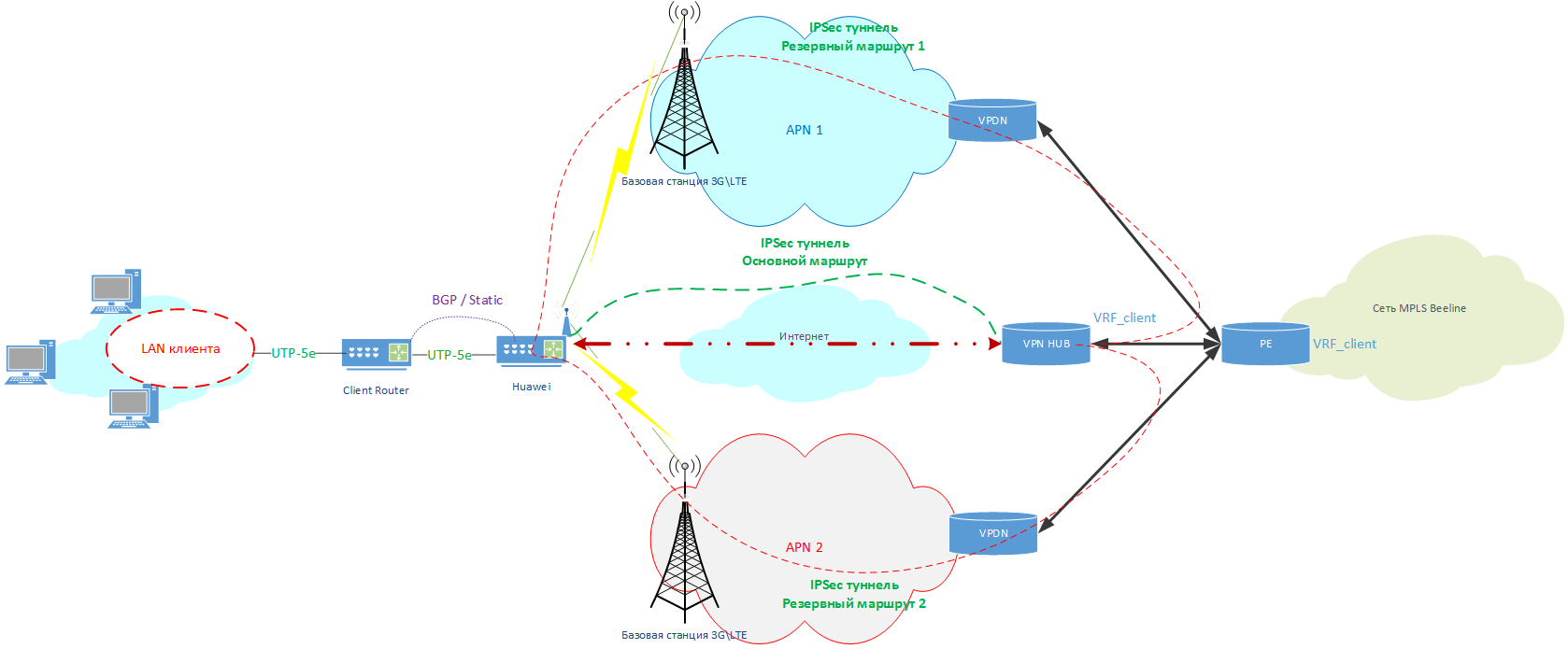
クリック可能
クライアントは一度に最大3つのWANチャネルを取得します。これは、IPCトラフィックの「アンダーレイ」の役割を果たします。
- 有線インターネットアクセスチャネル。
- 最初の(メイン)LTEネットワーク。
- 2番目の(バックアップ)LTEネットワーク(必要な場合)。
現在、このサービス提供オプション用のルーターを選択して構成する必要があります。
ルーターの構成
ルーターを選ぶとき、Huaweiの2つのモデルAR161とAR129に興味がありました。これらには、IPSecサポート、2つのSIMカードをサポートするLTEモデム、4つのイーサネットLANポート+ 1つのイーサネットWANがあり、AR129にはWiFiもあります。つまり、回路が機能するために必要なすべてのものなどです。
しかし、設定により、すべてがはるかに複雑であることが判明しました。
Multisim Redundancy用にルーターを構成する際、最適なトラフィックルートを選択するために有線WANと2つのLTEネットワーク間の優先順位の問題に直面しました。
Huawei AR161 / 129には、このための2つのツールがあります。
- ネットワーク品質分析機能(別名NQAテスト)。
指定されたホストへのicmp要求を使用して基本的なテストを実行し、その可用性を判断します。 - オープンプログラマビリティシステム(OPS)+ Python機能。
非常に強力なツールであり、ログに情報を保存し、icmp統計に基づいて「インテリジェント」な切り替えを実行できますが、習得も困難です。
この問題を解決するために、OPS + Python機能を選択して2つのLTE SIMのみを有効にし、インターネットと2つのLTESIMの混合モードを選択しました。
ルーターのおおよその構成は次のとおりです。
2x SimLTE接続のみの場合
#  IP    WAN  (  DHCP)
interface GigabitEthernet0/0/4
ip address dhcp-alloc

# APN , Cellular0/0/0
apn profile [APN #1]
 apn [APN 1 NAME]
apn profile [APN #2]
 apn [APN 2 NAME]
 sim-id 2

# Cellular0/0/0
interface Cellular0/0/0
dialer enable-circular
 apn-profile [APN #1] priority 120
 apn-profile [APN #2]
 dialer timer autodial 60
 profile create lte-default [APN #1] sim-id 1
 profile create lte-default [APN #2] sim-id 2
 ip address negotiate
modem reboot

# IPSec
ipsec authentication sha2 compatible enable
ike local-name [IPSEC_LOGIN]

#   IPSec
ipsec proposal ipsec
 esp authentication-algorithm sha2-256
 esp encryption-algorithm aes-256
ike proposal 1
 encryption-algorithm aes-256
 dh group2
 authentication-algorithm sha2-256
 authentication-method pre-share
 integrity-algorithm hmac-sha2-256
 prf hmac-sha2-256

#  IPSec
ike peer ipsec_1
 pre-shared-key simple [IPSEC_PASSWORD]
 ike-proposal 1
 local-id-type fqdn
 remote-id-type ip
 dpd type periodic
 dpd idle-time 10
 dpd retransmit-interval 2
 remote-address 100.64.0.100
 route accept
 config-exchange request
 config-exchange set accept
 config-exchange set send
ipsec profile ipsecprof_1
 ike-peer ipsec_1
 proposal ipsec

# IPSec -
interface Tunnel0/0/0
tunnel-protocol ipsec
 ip address [ IP   - Huawei]  255.255.255.252
source Cellular0/0/0
ipsec profile ipsecprof_1

#
ip route-static 0.0.0.0 0.0.0.0 Tunnel0/0/0
ip route-static [VPN HUB INTERNAL ADDRESS] 255.255.0.0 Cellular0/0/0
インターネット+ 2x SimLTEを含む場合
#  IP    WAN  (  DHCP)
interface GigabitEthernet0/0/4
ip address dhcp-alloc

# APN , Cellular0/0/0
apn profile [APN #1]
 apn [APN 1 NAME]
apn profile [APN #2]
 apn [APN 2 NAME]
 sim-id 2

# Cellular0/0/0
interface Cellular0/0/0
dialer enable-circular
 apn-profile [APN #1] priority 120
 apn-profile [APN #2]
 dialer timer autodial 60
 profile create lte-default [APN #1] sim-id 1
 profile create lte-default [APN #2] sim-id 2
 ip address negotiate
modem reboot

# IPSec
ipsec authentication sha2 compatible enable
ike local-name [IPSEC_LOGIN]

#   IPSec
ipsec proposal ipsec
 esp authentication-algorithm sha2-256
 esp encryption-algorithm aes-256
ike proposal 1
 encryption-algorithm aes-256
 dh group2
 authentication-algorithm sha2-256
 authentication-method pre-share
 integrity-algorithm hmac-sha2-256
 prf hmac-sha2-256

#  IPSec
ike peer ipsec_1
 pre-shared-key simple [IPSEC_PASSWORD]
 ike-proposal 1
 local-id-type fqdn
 remote-id-type ip
 dpd type periodic
 dpd idle-time 10
 dpd retransmit-interval 2
 remote-address 81.211.80.50
 route accept
 config-exchange request
 config-exchange set accept
 config-exchange set send
ipsec profile ipsecprof_1
 ike-peer ipsec_1
 proposal ipsec

ike peer ipsec_2
 pre-shared-key simple [IPSEC_PASSWORD]
 ike-proposal 1
 local-id-type fqdn
 remote-id-type ip
 dpd type periodic
 dpd idle-time 10
 dpd retransmit-interval 2
 remote-address [VPN HUB INTERNAL ADDRESS]
 route accept
 config-exchange request
 config-exchange set accept
 config-exchange set send
ipsec profile ipsecprof_2
 ike-peer ipsec_2
 proposal ipsec

# IPSec-
interface LoopBack32
 ip address [ IP   - Huawei]  255.255.255.252

interface Tunnel0/0/0
ip address unnumbered interface LoopBack32
tunnel-protocol ipsec
 source GigabitEthernet0/0/1
 ipsec profile ipsecprof_1

interface Tunnel0/0/1
ip address unnumbered interface LoopBack32
tunnel-protocol ipsec
 source Cellular0/0/0
 ipsec profile ipsecprof_2

#   (   )
nqa test-instance [username] inet
 test-type icmp
 destination-address ipv4 81.211.80.50
 source-interface GigabitEthernet0/0/4
 frequency 16
 probe-count 2
 start now

#
ip route-static 81.211.80.50 255.255.255.255 GigabitEthernet 0/0/4 dhcp track nqa [username] inet
ip route-static [VPN HUB INTERNAL ADDRESS] 255.255.255.255 NULL0 track nqa [username] inet
ip route-static [VPN HUB INTERNAL ADDRESS] 255.255.0.0 Cellular0/0/0 preference 70
ip route-static 80.240.216.155 255.255.255.255 GigabitEthernet 0/0/4 dhcp
ip route-static 194.67.0.206 255.255.255.255 GigabitEthernet 0/0/4 dhcp
すべて、構成されたルーターをクライアントにインストールできます。
予定
このソリューションを開発する計画から:
- 同じことを行いますが、Cisco / Mikrotikルーターで行います。
- すべてのスイッチングロジックをOPS + Pythonのみに変換します
次の記事では、Cloud PBXを使用してMultisim予約サービスと友達になり、x-connectを使用して同じHuaweiでL2-over-L3モードを作成し、PythonでSIMカードを切り替えるためのスクリプトをレイアウトし、ルーターでのUSB展開について説明します。 RnDの同僚、特にDenis Zinchenko(
ジンチ)とAndrey Voronovが、これらの技術ソリューションを準備し、記事の作成を支援しました。
PS:投稿の最初の部分はここにあります。