前の例では、HTTPセッション(およびCookie)を使用してサーバーへの要求を承認しました。ただし、RESTアーキテクチャの要件の1つは状態の欠如であるため、RESTサービスの実装には、この認証方法は適していません。この記事では、アクセストークンを使用して実行されるリクエストの承認であるRESTサービスを実装します。
少し理論
認証は、ユーザーの資格情報(ログイン/パスワード)を確認するプロセスです。ユーザー認証は、彼が入力したログイン/パスワードを保存されたデータと比較することによって実行されます。
承認とは、特定のリソースにアクセスするためのユーザーの権利を確認することです。ユーザーがリソースにアクセスすると、承認が直接実行されます。
上記の2つのリクエストの承認方法の作業順序を考えてみましょう。
HTTPセッションを使用したリクエストの承認:
- ユーザーは、任意の方法で認証されます。
- サーバー上にHTTPセッションが作成され、セッションIDを格納するJSESSIONIDCookieが作成されます。
- JSESSIONID cookieはクライアントに送信され、ブラウザーに保存されます。
- 後続のリクエストごとに、JSESSIONIDCookieがサーバーに送信されます。
- サーバーは、現在のユーザーに関する情報を含む対応するHTTPセッションを見つけ、ユーザーがこの呼び出しを行う権限を持っているかどうかを判断します。
- アプリケーションを終了するには、サーバーからHTTPセッションを削除する必要があります。
アクセストークンを使用したリクエストの承認:
- ユーザーは、任意の方法で認証されます。
- サーバーは秘密鍵で署名されたアクセストークンを生成し、それをクライアントに送信します。トークンには、ユーザーのIDとその役割が含まれています。
- トークンはクライアントに保存され、後続の各リクエストでサーバーに送信されます。通常、AuthorizationHTTPヘッダーはトークンの転送に使用されます。
- サーバーはトークンの署名を検証し、トークンからユーザーIDとその役割を抽出し、ユーザーがこの呼び出しを行う権利を持っているかどうかを判断します。
- アプリケーションを終了するには、サーバーと対話することなく、クライアント上のトークンを削除するだけです。
JSON Webトークン(JWT)は、現在、一般的なアクセストークン形式です。JWTトークンには、ドットで区切られた3つのブロック(ヘッダー、ペイロード、署名)が含まれています。最初の2つのブロックはJSON形式で、base64形式でエンコードされています。フィールドのセットは、予約済みの名前(iss、iat、exp)または任意の名前/値のペアで構成できます。署名は、対称暗号化アルゴリズムと非対称暗号化アルゴリズムの両方を使用して生成できます。
実装
次のAPIを提供するRESTサービスを実装します。
- GET / auth / login-ユーザー認証プロセスを開始します。
- POST / auth / token-アクセス/更新トークンの新しいペアを要求します。
- GET / api / repositories-現在のユーザーのBitbucketリポジトリのリストを取得します。
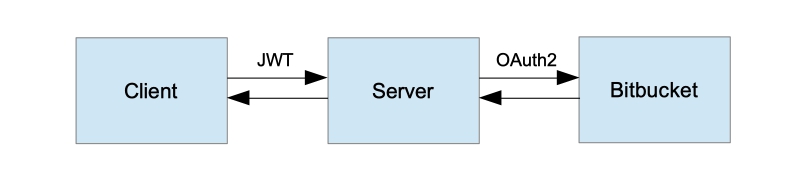
高レベルのアプリケーションアーキテクチャ
アプリケーションは3つの相互作用するコンポーネントで構成されているため、サーバーへのクライアントリクエストの承認に加えて、Bitbucketはサーバーリクエストを承認することに注意してください。例をより複雑にしないために、ロールによるメソッド許可を構成しません。認証されたユーザーのみが呼び出すことができるAPIメソッドGET / api / repositoriesは1つだけです。サーバーは、クライアントのOAuth登録で許可されているBitbucketのすべての操作を実行できます。
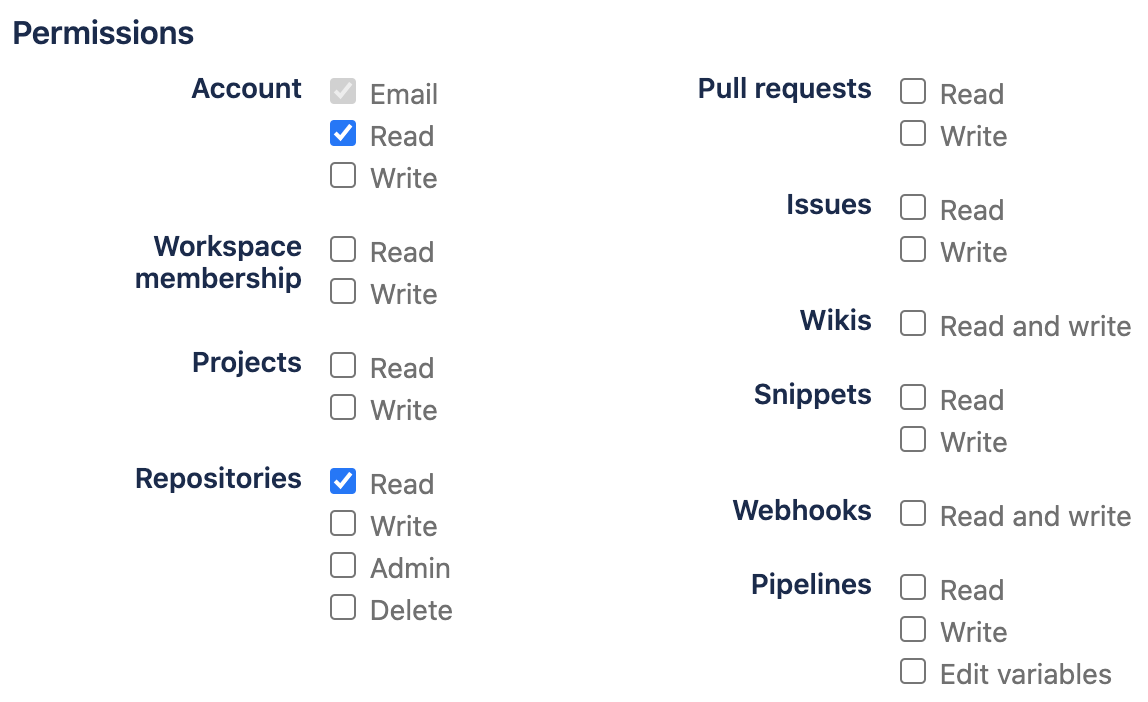
OAuthクライアントを登録するプロセスは、前の記事で説明されています。
実装には、SpringBootバージョン2.2.2.RELEASEおよびSpringSecurityバージョン5.2.1.RELEASEを使用します。
AuthenticationEntryPointをオーバーライドします
標準のWebアプリケーションでは、安全なリソースにアクセスし、セキュリティコンテキストに認証オブジェクトがない場合、SpringSecurityはユーザーを認証ページにリダイレクトします。ただし、RESTサービスの場合、この場合のより適切な動作は、HTTPステータス401(UNAUTHORIZED)を返すことです。
RestAuthenticationEntryPoint
public class RestAuthenticationEntryPoint implements AuthenticationEntryPoint {

    @Override
    public void commence(
            HttpServletRequest request,
            HttpServletResponse response,
            AuthenticationException authException) throws IOException {
        response.sendError(HttpServletResponse.SC_UNAUTHORIZED, authException.getMessage());
    }
}
ログインエンドポイントを作成する
ユーザー認証には、引き続き認証コード認証タイプのOAuth2を使用しています。ただし、前の手順では、標準のAuthenticationEntryPointを独自の実装に置き換えたため、認証プロセスを開始する明示的な方法が必要です。GETリクエストを/ auth / loginに送信すると、ユーザーはBitbucket認証ページにリダイレクトされます。このメソッドのパラメーターはコールバックURLになり、認証が成功した後にアクセストークンを返します。
ログインエンドポイント
@Path("/auth")
public class AuthEndpoint extends EndpointBase {

...

    @GET
    @Path("/login")
    public Response authorize(@QueryParam(REDIRECT_URI) String redirectUri) {
        String authUri = "/oauth2/authorization/bitbucket";
        UriComponentsBuilder builder = fromPath(authUri).queryParam(REDIRECT_URI, redirectUri);
        return handle(() -> temporaryRedirect(builder.build().toUri()).build());
    }
}
AuthenticationSuccessHandlerをオーバーライドします
AuthenticationSuccessHandlerは、認証が成功した後に呼び出されます。ここでアクセストークン、更新トークンを生成し、認証プロセスの開始時に送信されたコールバックアドレスにリダイレクトしましょう。GETリクエストパラメータを使用してアクセストークンを返し、httpOnlyCookieで更新トークンを返します。リフレッシュトークンとは後で分析します。
ExampleAuthenticationSuccessHandler
public class ExampleAuthenticationSuccessHandler extends SimpleUrlAuthenticationSuccessHandler {

    private final TokenService tokenService;

    private final AuthProperties authProperties;

    private final HttpCookieOAuth2AuthorizationRequestRepository authorizationRequestRepository;

    public ExampleAuthenticationSuccessHandler(
            TokenService tokenService,
            AuthProperties authProperties,
            HttpCookieOAuth2AuthorizationRequestRepository authorizationRequestRepository) {
        this.tokenService = requireNonNull(tokenService);
        this.authProperties = requireNonNull(authProperties);
        this.authorizationRequestRepository = requireNonNull(authorizationRequestRepository);
    }

    @Override
    public void onAuthenticationSuccess(HttpServletRequest request, HttpServletResponse response, Authentication authentication) throws IOException, ServletException {
        log.info("Logged in user {}", authentication.getPrincipal());
        super.onAuthenticationSuccess(request, response, authentication);
    }

    @Override
    protected String determineTargetUrl(HttpServletRequest request, HttpServletResponse response, Authentication authentication) {
        Optional<String> redirectUri = getCookie(request, REDIRECT_URI).map(Cookie::getValue);

        if (redirectUri.isPresent() && !isAuthorizedRedirectUri(redirectUri.get())) {
            throw new BadRequestException("Received unauthorized redirect URI.");
        }

        return UriComponentsBuilder.fromUriString(redirectUri.orElse(getDefaultTargetUrl()))
                .queryParam("token", tokenService.newAccessToken(toUserContext(authentication)))
                .build().toUriString();
    }

    @Override
    protected void handle(HttpServletRequest request, HttpServletResponse response, Authentication authentication) throws IOException {
        redirectToTargetUrl(request, response, authentication);
    }

    private boolean isAuthorizedRedirectUri(String uri) {
        URI clientRedirectUri = URI.create(uri);
        return authProperties.getAuthorizedRedirectUris()
                .stream()
                .anyMatch(authorizedRedirectUri -> {
                    // Only validate host and port. Let the clients use different paths if they want to.
                    URI authorizedURI = URI.create(authorizedRedirectUri);
                    return authorizedURI.getHost().equalsIgnoreCase(clientRedirectUri.getHost())
                            && authorizedURI.getPort() == clientRedirectUri.getPort();
                });
    }

    private TokenService.UserContext toUserContext(Authentication authentication) {
        ExampleOAuth2User principal = (ExampleOAuth2User) authentication.getPrincipal();
        return TokenService.UserContext.builder()
                .login(principal.getName())
                .name(principal.getFullName())
                .build();
    }

    private void addRefreshTokenCookie(HttpServletResponse response, Authentication authentication) {
        RefreshToken token = tokenService.newRefreshToken(toUserContext(authentication));
        addCookie(response, REFRESH_TOKEN, token.getId(), (int) token.getValiditySeconds());
    }

    private void redirectToTargetUrl(HttpServletRequest request, HttpServletResponse response, Authentication authentication) throws IOException {
        String targetUrl = determineTargetUrl(request, response, authentication);

        if (response.isCommitted()) {
            logger.debug("Response has already been committed. Unable to redirect to " + targetUrl);
            return;
        }

        addRefreshTokenCookie(response, authentication);
        authorizationRequestRepository.removeAuthorizationRequestCookies(request, response);
        getRedirectStrategy().sendRedirect(request, response, targetUrl);
    }
}
AuthenticationFailureHandlerをオーバーライドします
ユーザーが認証されていない場合、エラーテキストを含むエラーパラメータを使用して、認証プロセスの開始時に渡されたコールバックアドレスにユーザーをリダイレクトします。
ExampleAuthenticationFailureHandler
public class ExampleAuthenticationFailureHandler implements AuthenticationFailureHandler {

    private final RedirectStrategy redirectStrategy = new DefaultRedirectStrategy();

    private final HttpCookieOAuth2AuthorizationRequestRepository authorizationRequestRepository;

    public ExampleAuthenticationFailureHandler(
            HttpCookieOAuth2AuthorizationRequestRepository authorizationRequestRepository) {
        this.authorizationRequestRepository = requireNonNull(authorizationRequestRepository);
    }

    @Override
    public void onAuthenticationFailure(HttpServletRequest request, HttpServletResponse response, AuthenticationException exception) throws IOException {
        String targetUrl = getFailureUrl(request, exception);
        authorizationRequestRepository.removeAuthorizationRequestCookies(request, response);
        redirectStrategy.sendRedirect(request, response, targetUrl);
    }

    private String getFailureUrl(HttpServletRequest request, AuthenticationException exception) {
        String targetUrl = getCookie(request, Cookies.REDIRECT_URI)
                .map(Cookie::getValue)
                .orElse(("/"));

        return UriComponentsBuilder.fromUriString(targetUrl)
                .queryParam("error", exception.getLocalizedMessage())
                .build().toUriString();
    }
}
TokenAuthenticationFilterを作成します
このフィルターのタスクは、Authorizationヘッダー(存在する場合)からアクセストークンを抽出して検証し、セキュリティコンテキストを初期化することです。
TokenAuthenticationFilter
public class TokenAuthenticationFilter extends OncePerRequestFilter {

    private final UserService userService;

    private final TokenService tokenService;

    public TokenAuthenticationFilter(
            UserService userService, TokenService tokenService) {
        this.userService = requireNonNull(userService);
        this.tokenService = requireNonNull(tokenService);
    }

    @Override
    protected void doFilterInternal(@NotNull HttpServletRequest request, @NotNull HttpServletResponse response, @NotNull FilterChain chain) throws ServletException, IOException {
        try {
            Optional<String> jwtOpt = getJwtFromRequest(request);
            if (jwtOpt.isPresent()) {
                String jwt = jwtOpt.get();
                if (isNotEmpty(jwt) && tokenService.isValidAccessToken(jwt)) {
                    String login = tokenService.getUsername(jwt);
                    Optional<User> userOpt = userService.findByLogin(login);
                    if (userOpt.isPresent()) {
                        User user = userOpt.get();
                        ExampleOAuth2User oAuth2User = new ExampleOAuth2User(user);
                        OAuth2AuthenticationToken authentication = new OAuth2AuthenticationToken(oAuth2User, oAuth2User.getAuthorities(), oAuth2User.getProvider());
                        authentication.setDetails(new WebAuthenticationDetailsSource().buildDetails(request));

                        SecurityContextHolder.getContext().setAuthentication(authentication);
                    }
                }
            }
        } catch (Exception e) {
            logger.error("Could not set user authentication in security context", e);
        }

        chain.doFilter(request, response);
    }

    private Optional<String> getJwtFromRequest(HttpServletRequest request) {
        String token = request.getHeader(AUTHORIZATION);
        if (isNotEmpty(token) && token.startsWith("Bearer ")) {
            token = token.substring(7);
        }
        return Optional.ofNullable(token);
    }
}
更新トークンエンドポイントを作成する
セキュリティ上の理由から、アクセストークンの有効期間は通常短く保たれます。そうすれば、盗まれた場合、攻撃者はそれを無期限に使用することができなくなります。ユーザーにアプリケーションへのログインを何度も強制しないようにするために、更新トークンが使用されます。これは、アクセストークンとともに認証が成功した後にサーバーによって発行され、有効期間が長くなります。これを使用して、トークンの新しいペアを要求できます。更新トークンをhttpOnlyCookieに保存することをお勧めします。
トークンエンドポイントを更新
@Path("/auth")
public class AuthEndpoint extends EndpointBase {

...

    @POST
    @Path("/token")
    @Produces(APPLICATION_JSON)
    public Response refreshToken(@CookieParam(REFRESH_TOKEN) String refreshToken) {
        return handle(() -> {
            if (refreshToken == null) {
                throw new InvalidTokenException("Refresh token was not provided.");
            }
            RefreshToken oldRefreshToken = tokenService.findRefreshToken(refreshToken);
            if (oldRefreshToken == null || !tokenService.isValidRefreshToken(oldRefreshToken)) {
                throw new InvalidTokenException("Refresh token is not valid or expired.");
            }

            Map<String, String> result = new HashMap<>();
            result.put("token", tokenService.newAccessToken(of(oldRefreshToken.getUser())));

            RefreshToken newRefreshToken = newRefreshTokenFor(oldRefreshToken.getUser());
            return Response.ok(result).cookie(createRefreshTokenCookie(newRefreshToken)).build();
        });
    }
}
AuthorizationRequestRepositoryをオーバーライドします
Spring Securityは、AuthorizationRequestRepositoryオブジェクトを使用して、認証プロセスの期間中、OAuth2AuthorizationRequestオブジェクトを格納します。デフォルトの実装はHttpSessionOAuth2AuthorizationRequestRepositoryクラスで、HTTPセッションをリポジトリとして使用します。なぜなら 私たちのサービスは状態を保存するべきではありません、この実装は私たちに適していません。HTTPCookieを使用する独自のクラスを実装しましょう。
HttpCookieOAuth2AuthorizationRequestRepository
public class HttpCookieOAuth2AuthorizationRequestRepository implements AuthorizationRequestRepository<OAuth2AuthorizationRequest> {

    private static final int COOKIE_EXPIRE_SECONDS = 180;

    private static final String OAUTH2_AUTHORIZATION_REQUEST_COOKIE_NAME = "OAUTH2-AUTH-REQUEST";

    @Override
    public OAuth2AuthorizationRequest loadAuthorizationRequest(HttpServletRequest request) {
        return getCookie(request, OAUTH2_AUTHORIZATION_REQUEST_COOKIE_NAME)
                .map(cookie -> deserialize(cookie, OAuth2AuthorizationRequest.class))
                .orElse(null);
    }

    @Override
    public void saveAuthorizationRequest(OAuth2AuthorizationRequest authorizationRequest, HttpServletRequest request, HttpServletResponse response) {
        if (authorizationRequest == null) {
            removeAuthorizationRequestCookies(request, response);
            return;
        }

        addCookie(response, OAUTH2_AUTHORIZATION_REQUEST_COOKIE_NAME, serialize(authorizationRequest), COOKIE_EXPIRE_SECONDS);
        String redirectUriAfterLogin = request.getParameter(QueryParams.REDIRECT_URI);
        if (isNotBlank(redirectUriAfterLogin)) {
            addCookie(response, REDIRECT_URI, redirectUriAfterLogin, COOKIE_EXPIRE_SECONDS);
        }
    }

    @Override
    public OAuth2AuthorizationRequest removeAuthorizationRequest(HttpServletRequest request) {
        return loadAuthorizationRequest(request);
    }

    public void removeAuthorizationRequestCookies(HttpServletRequest request, HttpServletResponse response) {
        deleteCookie(request, response, OAUTH2_AUTHORIZATION_REQUEST_COOKIE_NAME);
        deleteCookie(request, response, REDIRECT_URI);
    }

    private static String serialize(Object object) {
        return Base64.getUrlEncoder().encodeToString(SerializationUtils.serialize(object));
    }

    @SuppressWarnings("SameParameterValue")
    private static <T> T deserialize(Cookie cookie, Class<T> clazz) {
        return clazz.cast(SerializationUtils.deserialize(Base64.getUrlDecoder().decode(cookie.getValue())));
    }
}
SpringSecurityの構成
上記のすべてをまとめて、SpringSecurityを構成しましょう。
WebSecurityConfig
@Configuration
@EnableWebSecurity
public static class WebSecurityConfig extends WebSecurityConfigurerAdapter {

    private final ExampleOAuth2UserService userService;

    private final TokenAuthenticationFilter tokenAuthenticationFilter;

    private final AuthenticationFailureHandler authenticationFailureHandler;

    private final AuthenticationSuccessHandler authenticationSuccessHandler;

    private final HttpCookieOAuth2AuthorizationRequestRepository authorizationRequestRepository;

    @Autowired
    public WebSecurityConfig(
            ExampleOAuth2UserService userService,
            TokenAuthenticationFilter tokenAuthenticationFilter,
            AuthenticationFailureHandler authenticationFailureHandler,
            AuthenticationSuccessHandler authenticationSuccessHandler,
            HttpCookieOAuth2AuthorizationRequestRepository authorizationRequestRepository) {
        this.userService = userService;
        this.tokenAuthenticationFilter = tokenAuthenticationFilter;
        this.authenticationFailureHandler = authenticationFailureHandler;
        this.authenticationSuccessHandler = authenticationSuccessHandler;
        this.authorizationRequestRepository = authorizationRequestRepository;
    }

    @Override
    protected void configure(HttpSecurity http) throws Exception {
        http
                .cors().and()
                .csrf().disable()
                .formLogin().disable()
                .httpBasic().disable()
                .sessionManagement(sm -> sm.sessionCreationPolicy(STATELESS))
                .exceptionHandling(eh -> eh
                        .authenticationEntryPoint(new RestAuthenticationEntryPoint())
                )
                .authorizeRequests(authorizeRequests -> authorizeRequests
                        .antMatchers("/auth/**").permitAll()
                        .anyRequest().authenticated()
                )
                .oauth2Login(oauth2Login -> oauth2Login
                        .failureHandler(authenticationFailureHandler)
                        .successHandler(authenticationSuccessHandler)
                        .userInfoEndpoint(userInfoEndpoint -> userInfoEndpoint.userService(userService))
                        .authorizationEndpoint(authEndpoint -> authEndpoint.authorizationRequestRepository(authorizationRequestRepository))
                );

        http.addFilterBefore(tokenAuthenticationFilter, UsernamePasswordAuthenticationFilter.class);
    }
}
リポジトリエンドポイントを作成する
そのため、OAuth2とBitbucketによる認証が必要でした。これは、BitbucketAPIを使用してリソースにアクセスする機能です。BitbucketリポジトリAPIを使用して、現在のユーザーのリポジトリのリストを取得します。
リポジトリエンドポイント
@Path("/api")
public class ApiEndpoint extends EndpointBase {

    @Autowired
    private BitbucketService bitbucketService;

    @GET
    @Path("/repositories")
    @Produces(APPLICATION_JSON)
    public List<Repository> getRepositories() {
        return handle(bitbucketService::getRepositories);
    }
}

public class BitbucketServiceImpl implements BitbucketService {

    private static final String BASE_URL = "https://api.bitbucket.org";

    private final Supplier<RestTemplate> restTemplate;

    public BitbucketServiceImpl(Supplier<RestTemplate> restTemplate) {
        this.restTemplate = restTemplate;
    }

    @Override
    public List<Repository> getRepositories() {
        UriComponentsBuilder uriBuilder = fromHttpUrl(format("%s/2.0/repositories", BASE_URL));
        uriBuilder.queryParam("role", "member");

        ResponseEntity<BitbucketRepositoriesResponse> response = restTemplate.get().exchange(
                uriBuilder.toUriString(),
                HttpMethod.GET,
                new HttpEntity<>(new HttpHeadersBuilder()
                        .acceptJson()
                        .build()),
                BitbucketRepositoriesResponse.class);

        BitbucketRepositoriesResponse body = response.getBody();
        return body == null ? emptyList() : extractRepositories(body);
    }

    private List<Repository> extractRepositories(BitbucketRepositoriesResponse response) {
        return response.getValues() == null
                ? emptyList()
                : response.getValues().stream().map(BitbucketServiceImpl.this::convertRepository).collect(toList());
    }

    private Repository convertRepository(BitbucketRepository bbRepo) {
        Repository repo = new Repository();
        repo.setId(bbRepo.getUuid());
        repo.setFullName(bbRepo.getFullName());
        return repo;
    }
}
テスト
テストには、アクセストークンを送信するための小さなHTTPサーバーが必要です。まず、アクセストークンなしでリポジトリエンドポイントを呼び出して、この場合に401エラーが発生することを確認してから、認証します。これを行うには、サーバーを起動し、http:// localhost:8080 / auth / loginにあるブラウザーに移動します。ユーザー名/パスワードを入力すると、クライアントはトークンを受け取り、リポジトリエンドポイントを再度呼び出します。次に、新しいトークンが要求され、リポジトリエンドポイントが新しいトークンで再度呼び出されます。
OAuth2JwtExampleClient
public class OAuth2JwtExampleClient {

    /**
     * Start client, then navigate to http://localhost:8080/auth/login.
     */
    public static void main(String[] args) throws Exception {
        AuthCallbackHandler authEndpoint = new AuthCallbackHandler(8081);
        authEndpoint.start(SOCKET_READ_TIMEOUT, true);

        HttpResponse response = getRepositories(null);
        assert (response.getStatusLine().getStatusCode() == SC_UNAUTHORIZED);

        Tokens tokens = authEndpoint.getTokens();
        System.out.println("Received tokens: " + tokens);
        response = getRepositories(tokens.getAccessToken());
        assert (response.getStatusLine().getStatusCode() == SC_OK);
        System.out.println("Repositories: " + IOUtils.toString(response.getEntity().getContent(), UTF_8));

        // emulate token usage - wait for some time until iat and exp attributes get updated
        // otherwise we will receive the same token
        Thread.sleep(5000);

        tokens = refreshToken(tokens.getRefreshToken());
        System.out.println("Refreshed tokens: " + tokens);

        // use refreshed token
        response = getRepositories(tokens.getAccessToken());
        assert (response.getStatusLine().getStatusCode() == SC_OK);
    }

    private static Tokens refreshToken(String refreshToken) throws IOException {
        BasicClientCookie cookie = new BasicClientCookie(REFRESH_TOKEN, refreshToken);
        cookie.setPath("/");
        cookie.setDomain("localhost");
        BasicCookieStore cookieStore = new BasicCookieStore();
        cookieStore.addCookie(cookie);

        HttpPost request = new HttpPost("http://localhost:8080/auth/token");
        request.setHeader(ACCEPT, APPLICATION_JSON.getMimeType());

        HttpClient httpClient = HttpClientBuilder.create().setDefaultCookieStore(cookieStore).build();
        HttpResponse execute = httpClient.execute(request);

        Gson gson = new Gson();
        Type type = new TypeToken<Map<String, String>>() {
        }.getType();
        Map<String, String> response = gson.fromJson(IOUtils.toString(execute.getEntity().getContent(), UTF_8), type);

        Cookie refreshTokenCookie = cookieStore.getCookies().stream()
                .filter(c -> REFRESH_TOKEN.equals(c.getName()))
                .findAny()
                .orElseThrow(() -> new IOException("Refresh token cookie not found."));
        return Tokens.of(response.get("token"), refreshTokenCookie.getValue());
    }

    private static HttpResponse getRepositories(String accessToken) throws IOException {
        HttpClient httpClient = HttpClientBuilder.create().build();
        HttpGet request = new HttpGet("http://localhost:8080/api/repositories");
        request.setHeader(ACCEPT, APPLICATION_JSON.getMimeType());
        if (accessToken != null) {
            request.setHeader(AUTHORIZATION, "Bearer " + accessToken);
        }
        return httpClient.execute(request);
    }
}
クライアントコンソールの出力。
Received tokens: Tokens(accessToken=eyJhbGciOiJIUzUxMiJ9.eyJzdWIiOiJldm9sdmVjaS10ZXN0a2l0IiwidXNlcm5hbWUiOiJFdm9sdmVDSSBUZXN0a2l0IiwiaWF0IjoxNjA1NDY2MDMxLCJleHAiOjE2MDU0NjY2MzF9.UuRYMdIxzc8ZFEI2z8fAgLz-LG_gDxaim25pMh9jNrDFK6YkEaDqDO8Huoav5JUB0bJyf1lTB0nNPaLLpOj4hw, refreshToken=BBF6dboG8tB4XozHqmZE5anXMHeNUncTVD8CLv2hkaU2KsfyqitlJpgkV4HrQqPk)

Repositories: [{"id":"{c7bb4165-92f1-4621-9039-bb1b6a74488e}","fullName":"test-namespace/test-repository1"},{"id":"{aa149604-c136-41e1-b7bd-3088fb73f1b2}","fullName":"test-namespace/test-repository2"}]

Refreshed tokens: Tokens(accessToken=eyJhbGciOiJIUzUxMiJ9.eyJzdWIiOiJldm9sdmVjaS10ZXN0a2l0IiwidXNlcm5hbWUiOiJFdm9sdmVDSSBUZXN0a2l0IiwiaWF0IjoxNjA1NDY2MDM2LCJleHAiOjE2MDU0NjY2MzZ9.oR2A_9k4fB7qpzxvV5QKY1eU_8aZMYEom-ngc4Kuc5omeGPWyclfqmiyQTpJW_cHOcXbY9S065AE_GKXFMbh_Q, refreshToken=mdc5sgmtiwLD1uryubd2WZNjNzSmc5UGo6JyyzsiYsBgOpeaY3yw3T3l8IKauKYQ)
ソース
レビューされたアプリケーションの完全なソースコードはGithubにあります。
リンク
PS
私たちが作成したRESTサービスは、例を複雑にしないようにHTTPプロトコル上で実行されます。ただし、トークンは暗号化されていないため、セキュアチャネル(HTTPS)に切り替えることをお勧めします。