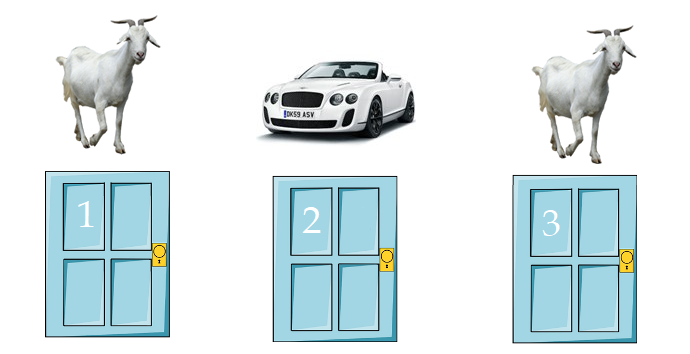
Powershellでパイプラインを使用する
アルゴリズムは単純です。最初はランダムドアジェネレーター、次にユーザー選択ジェネレーター、次にプレゼンターのドア開放ロジック、別のユーザーアクションと統計カウントです。
そして、これを手伝ってくれるのは、
ValueFromPipeline
コマンドレットを1つずつ指定して、オブジェクトを段階的に変換できるパワーツールです 。これは私たちのパイプラインがどのように見えるべきかです:
New-Doors | Select-Door | Open-Door | Invoke-UserAction
New-Doors
新しいドアを生成し、チームで
Select-Door
プレーヤーがドアの1つを選択し、
Open-Door
リーダーがヤギが絶対に存在せず、プレーヤーが選択しなかったドアを開きます。ここでは、
Invoke-UserAction
さまざまなユーザーの行動をシミュレートします。
ドアを表すオブジェクトが左から右に移動し、徐々に変形します。
コードを書くこの方法は、責任の明確な分割でそれをバラバラに保つのに役立ちます。
Powershellには独自の規則があります。関数の正しい命名に関する規則を含め 、それらも遵守する必要があり、私たちはそれらにほぼ準拠しています。
ドアを作る
状況をシミュレートするので、ドアについても詳しく説明します。
ドアには山羊か車が入っています。ドアはプレイヤーが選択するか、ホストが開くことができます。
class Door {
<#
, .
.
#>
[string]$Contains = "Goat"
[bool]$Selected = $false
[bool]$Opened = $false
}
各ドアを別々のクラスの別々のフィールドに配置します。
class Doors {
<#
, 3
#>
[Door]$DoorOne
[Door]$DoorTwo
[Door]$DoorThree
}
それらすべてのドアを一列に並べることは可能でしたが、すべてが詳細に説明されているほど良いです。ちなみに、Powershell 7では、クラス、そのコンストラクター、メソッド、その他すべてがOOPであり、ほぼ正常に機能しますが、それについては別の機会に説明します。
ランダムドアジェネレータは次のようになります。まず、ドアのわき柱ごとに独自のドアが生成され、次にジェネレーターがそのうちのどれを車にするかを選択します。
function New-Doors {
<#
.
#>
$i = [Doors]::new()
$i.DoorOne = [Door]::new()
$i.DoorTwo = [Door]::new()
$i.DoorThree = [Door]::new()
switch ( Get-Random -Maximum 3 -Minimum 0 ) {
0 {
$i.DoorOne.Contains = "Car"
}
1 {
$i.DoorTwo.Contains = "Car"
}
2 {
$i.DoorThree.Contains = "Car"
}
Default {
Write-Error "Something in door generator went wrong"
break
}
}
return $i
私たちのパイプは次のようになります:
New-Doors
プレイヤーがドアを選ぶ
それでは、最初の選択について説明しましょう。プレイヤーは3つのドアから1つを選択できます。より多くの状況をシミュレートするために、プレイヤーに毎回最初のドアのみ、2番目のドアのみ、3番目のドアのみ、およびランダムなドアを選択させます。
[Parameter(Mandatory)]
[ValidateSet("First", "Second", "Third", "Random")]
$Principle
パイプラインから引数を受け入れるには、これを行うパラメーターブロックで変数を指定する必要があります。これは次のように行われます。
[parameter(ValueFromPipeline)]
[Doors]$i
ValueFromPipeline
なしで 書くことができます
True
。
完成したドア選択ブロックは次のようになります。
function Select-Door {
<#
.
#>
Param (
[parameter(ValueFromPipeline)]
[Doors]$i,
[Parameter(Mandatory)]
[ValidateSet("First", "Second", "Third", "Random")]
$Principle
)
switch ($Principle) {
"First" {
$i.DoorOne.Selected = $true
}
"Second" {
$i.DoorTwo.Selected = $true
}
"Third" {
$i.DoorThree.Selected = $true
}
"Random" {
switch ( Get-Random -Maximum 3 -Minimum 0 ) {
0 {
$i.DoorOne.Selected = $true
}
1 {
$i.DoorTwo.Selected = $true
}
2 {
$i.DoorThree.Selected = $true
}
Default {
Write-Error "Something in door selector went wrong"
break
}
}
}
Default {
Write-Error "Something in door selector went wrong"
break
}
}
return $i
私たちのパイプは次のようになります:
New-Doors | Select-Door -Principle Random
リーディングが扉を開く
ここではすべてが非常に簡単です。プレイヤーがドアを選択しておらず、その後ろにヤギがいる場合は、フィールド
Opened
をに 変更します
True
。具体的には、この場合、コマンドに単語を付けるのは
Open
正しくありません。呼び出されたリソースは読み取られませんが、変更されます。このような場合は、を使用します
Set
が
Open
、わかりやすくするために残しておきます。
function Open-Door {
<#
, , .
#>
Param (
[parameter(ValueFromPipeline)]
[Doors]$i
)
switch ($false) {
$i.DoorOne.Selected {
if ($i.DoorOne.Contains -eq "Goat") {
$i.DoorOne.Opened = $true
continue
}
}
$i.DoorTwo.Selected {
if ($i.DoorTwo.Contains -eq "Goat") {
$i.DoorTwo.Opened = $true
continue
}
}
$i.DoorThree.Selected {
if ($i.DoorThree.Contains -eq "Goat") {
$i.DoorThree.Opened = $true
continue
}
}
}
return $i
シミュレーションをより説得力のあるものにするために
$true
、ドア配列からオブジェクトを削除する代わりに、.openedフィールドをに変更してこのドアを「開き」 ます。 スイッチを
忘れないでください
continue
。最初の一致後に比較が停止することはありません。 スイッチを終了してスクリプトの
Coninue
実行を続行すると、スイッチのオペレーター
break
がスクリプトを終了します。
パイプにもう1つの関数を追加すると、次のようになります。
New-Doors | Select-Door -Principle Random | Open-Door
プレイヤーは自分の選択を変更します
プレイヤーはドアを変更するか、変更しません。パラメータブロックには、パイプからの変数とブール引数のみがあります。 このような関数の名前には、同期操作と非同期操作を呼び出すことを意味する ため、この
単語
Invoke
を 使用してください 。規則と推奨事項に従ってください。
Invoke
Start
function Invoke-UserAction {
<#
, .
#>
Param (
[parameter(ValueFromPipeline)]
[Doors]$i,
[Parameter(Mandatory)]
[bool]$SwitchDoor
)
if ($true -eq $SwitchDoor) {
switch ($false) {
$i.DoorOne.Opened {
if ( $i.DoorOne.Selected ) {
$i.DoorOne.Selected = $false
}
else {
$i.DoorOne.Selected = $true
}
}
$i.DoorTwo.Opened {
if ( $i.DoorTwo.Selected ) {
$i.DoorTwo.Selected = $false
}
else {
$i.DoorTwo.Selected = $true
}
}
$i.DoorThree.Opened {
if ( $i.DoorThree.Selected ) {
$i.DoorThree.Selected = $false
}
else {
$i.DoorThree.Selected = $true
}
}
}
}
return $i
分岐と比較の演算子では、最初にシステム変数と静的変数を指定する必要があります。おそらく、あるオブジェクトを別のオブジェクトに変換するのは難しいかもしれませんが、著者が以前に別の方法で書いたとき、そのような困難に遭遇することはありませんでした。
パイプラインの別の機能。
New-Doors | Select-Door -Principle Random | Open-Door | Invoke-UserAction -SwitchDoor $True
この記述アプローチの利点は明らかです。なぜなら、関数を明確に分離してコードを部分に分割することがこれまでになく便利だったからです。
プレイヤーの行動
プレーヤーがドアを変更する頻度。動作には5つの行があります。
Never
-プレーヤーが選択を変更することはありませんFifty-Fifty
-50から50。シミュレーションの数は2つのパスに分割されます。プレイヤーがドアを変更しない最初のパス、2番目のパスが変更されます。Random
-新しいシミュレーションごとに、プレーヤーはコインを弾きますAlways
-プレイヤーは常に自分の選択を変更します。Ration
-プレーヤーはN%のケースで選択を変更します。
switch ($SwitchDoors) {
"Never" {
0..$Count | ForEach-Object {
$Win += Invoke-Simulation -Door $Door -SwitchDoors $false
}
continue
}
"FiftyFifty" {
$Fifty = [math]::Round($Count / 2)
0..$Fifty | ForEach-Object {
$Win += Invoke-Simulation -Door $Door -SwitchDoors $false
}
0..$Fifty | ForEach-Object {
$Win += Invoke-Simulation -Door $Door -SwitchDoors $true
}
continue
}
"Random" {
0..$Count | ForEach-Object {
[bool]$Random = Get-Random -Maximum 2 -Minimum 0
$Win += Invoke-Simulation -Door $Door -SwitchDoors $Random
}
continue
}
"Always" {
0..$Count | ForEach-Object {
$Win += Invoke-Simulation -Door $Door -SwitchDoors $true
}
continue
}
"Ratio" {
$TrueRatio = $Ratio / 100 * $Count
$FalseRatio = $Count - $TrueRatio
0..$TrueRatio | ForEach-Object {
$Win += Invoke-Simulation -Door $Door -SwitchDoors $true
}
0..$FalseRatio | ForEach-Object {
$Win += Invoke-Simulation -Door $Door -SwitchDoors $false
}
continue
}
}
ForEach-Object
Powershell 7では、ループよりもはるかに高速に動作し
for
、さらに並列化できるため、ここではループの代わりに使用されます
for
。
コマンドレットのスタイリング
次に、コマンドレットを修正する必要があります。まず、着信引数の検証を行う必要があります。ボーナスは、人がフィールドに無効な引数を入力できないだけでなく、使用可能なすべての引数のリストがプロンプトに表示されることです。
パラメータブロックのコードは次のようになります。
param (
[Parameter(Mandatory = $false,
HelpMessage = "How often the player changes his choice.")]
[ValidateSet("Never", "FiftyFifty", "Random", "Always", "Ratio")]
$SwitchDoors = "Random"
)
これはヒントです:

パラメータブロックを実行する前
comment based help
。パラメータブロックの前のコードは次のようになります。
<#
.SYNOPSIS
Performs monty hall paradox simulation.
.DESCRIPTION
The Invoke-MontyHallParadox.ps1 script invoke monty hall paradox simulation.
.PARAMETER Door
Specifies door the player will choose during the entire simulation
.PARAMETER SwitchDoors
Specifies principle how the player changes his choice.
.PARAMETER Count
Specifies how many times to run the simulation.
.PARAMETER Ratio
If -SwitchDoors Ratio, specifies how often the player changes his choice. As a percentage."
.INPUTS
None. You cannot pipe objects to Update-Month.ps1.
.OUTPUTS
None. Update-Month.ps1 does not generate any output.
.EXAMPLE
PS> Invoke-MontyHallParadox -SwitchDoors Always -Count 10000
#>
プロンプトは次のようになります。
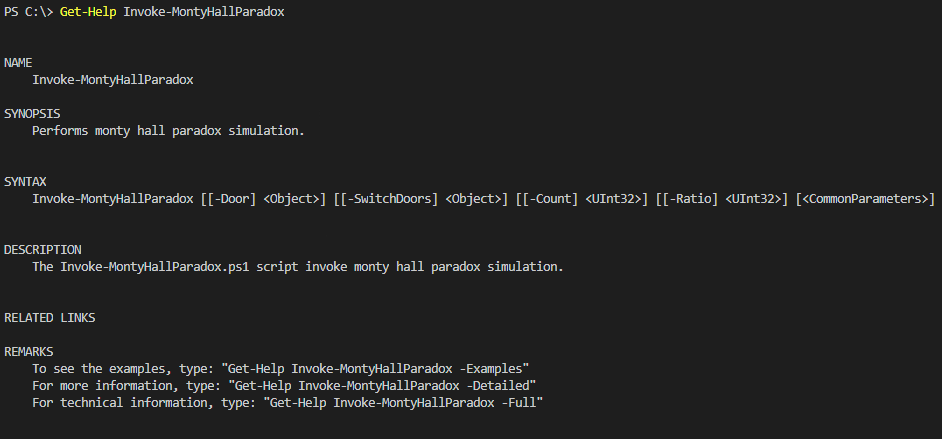
シミュレーションの実行
シミュレーション結果:
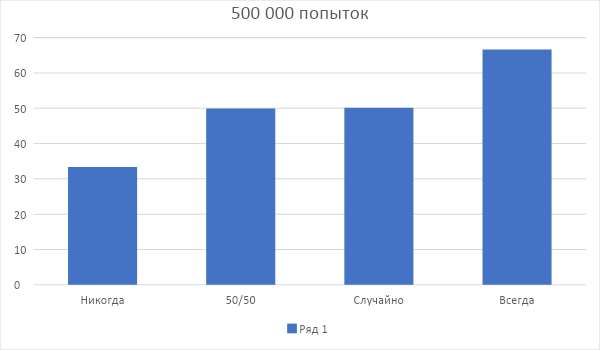
人が自分の選択を決して変えない場合、その人は33.37%の確率で勝ちます。
2つのパスの場合、その半分は選択の変更を拒否しますが、勝つ可能性は49.9134%であり、正確に50%に非常に近い値です。
コイントスの場合、何も変わらず、勝つ可能性は約50.131%のままです。
さて、プレイヤーが常に選択を変更した場合、勝つ可能性は66.6184%に上昇します。つまり、退屈で新しいことは何もありません。
パフォーマンス:パフォーマンスの
観点から。スクリプトは最適ではないようです。
String
代わりに
Bool
、内部にスイッチがあり、オブジェクトを相互に渡す多くの異なる関数がありますが、それでも、結果は次のとおりです。
Measure-Command
このスクリプトと別の作成者からのスクリプト用 。
比較は2つのシステムで実行され、pwsh 7.1はどこにでもあり、100,000パスでした。
▍I5-5200u
このアルゴリズム:
Days : 0 Hours : 0 Minutes : 0 Seconds : 4 Milliseconds : 581 Ticks : 45811819 TotalDays : 5,30229386574074E-05 TotalHours : 0,00127255052777778 TotalMinutes : 0,0763530316666667 TotalSeconds : 4,5811819 TotalMilliseconds : 4581,1819
そのアルゴリズム:
Days : 0 Hours : 0 Minutes : 0 Seconds : 5 Milliseconds : 104 Ticks : 51048392 TotalDays : 5,9083787037037E-05 TotalHours : 0,00141801088888889 TotalMinutes : 0,0850806533333333 TotalSeconds : 5,1048392 TotalMilliseconds : 5104,8392
▍I9-9900K
このアルゴリズム:
Days : 0 Hours : 0 Minutes : 0 Seconds : 1 Milliseconds : 891 Ticks : 18917629 TotalDays : 2,18954039351852E-05 TotalHours : 0,000525489694444444 TotalMinutes : 0,0315293816666667 TotalSeconds : 1,8917629 TotalMilliseconds : 1891,7629
そのアルゴリズム:
Days : 0 Hours : 0 Minutes : 0 Seconds : 1 Milliseconds : 954 Ticks : 19543236 TotalDays : 2,26194861111111E-05 TotalHours : 0,000542867666666667 TotalMinutes : 0,03257206 TotalSeconds : 1,9543236 TotalMilliseconds : 1954,3236
63msの利点がありますが、スクリプトが文字列を比較する回数を考えると、結果は依然として非常に奇妙です。
著者は、この記事がオッズが常に50から50であると信じている人々にとって説得力のある例として役立つことを望んでいますが、このスポイラーの下でコードを読むことができます。
コード全体
class Doors {
<#
, 3
#>
[Door]$DoorOne
[Door]$DoorTwo
[Door]$DoorThree
}
class Door {
<#
, .
.
#>
[string]$Contains = «Goat»
[bool]$Selected = $false
[bool]$Opened = $false
}
function New-Doors {
<#
.
#>
$i = [Doors]::new()
$i.DoorOne = [Door]::new()
$i.DoorTwo = [Door]::new()
$i.DoorThree = [Door]::new()
switch ( Get-Random -Maximum 3 -Minimum 0 ) {
0 {
$i.DoorOne.Contains = «Car»
}
1 {
$i.DoorTwo.Contains = «Car»
}
2 {
$i.DoorThree.Contains = «Car»
}
Default {
Write-Error «Something in door generator went wrong»
break
}
}
return $i
}
function Select-Door {
<#
.
#>
Param (
[parameter(ValueFromPipeline)]
[Doors]$i,
[Parameter(Mandatory)]
[ValidateSet(«First», «Second», «Third», «Random»)]
$Principle
)
switch ($Principle) {
«First» {
$i.DoorOne.Selected = $true
continue
}
«Second» {
$i.DoorTwo.Selected = $true
continue
}
«Third» {
$i.DoorThree.Selected = $true
continue
}
«Random» {
switch ( Get-Random -Maximum 3 -Minimum 0 ) {
0 {
$i.DoorOne.Selected = $true
continue
}
1 {
$i.DoorTwo.Selected = $true
continue
}
2 {
$i.DoorThree.Selected = $true
continue
}
Default {
Write-Error «Something in selector generator went wrong»
break
}
}
continue
}
Default {
Write-Error «Something in door selector went wrong»
break
}
}
return $i
}
function Open-Door {
<#
, , .
#>
Param (
[parameter(ValueFromPipeline)]
[Doors]$i
)
switch ($false) {
$i.DoorOne.Selected {
if ($i.DoorOne.Contains -eq «Goat») {
$i.DoorOne.Opened = $true
continue
}
}
$i.DoorTwo.Selected {
if ($i.DoorTwo.Contains -eq «Goat») {
$i.DoorTwo.Opened = $true
continue
}
}
$i.DoorThree.Selected {
if ($i.DoorThree.Contains -eq «Goat») {
$i.DoorThree.Opened = $true
continue
}
}
}
return $i
}
function Invoke-UserAction {
<#
, .
#>
Param (
[parameter(ValueFromPipeline)]
[Doors]$i,
[Parameter(Mandatory)]
[bool]$SwitchDoor
)
if ($true -eq $SwitchDoor) {
switch ($false) {
$i.DoorOne.Opened {
if ( $i.DoorOne.Selected ) {
$i.DoorOne.Selected = $false
}
else {
$i.DoorOne.Selected = $true
}
}
$i.DoorTwo.Opened {
if ( $i.DoorTwo.Selected ) {
$i.DoorTwo.Selected = $false
}
else {
$i.DoorTwo.Selected = $true
}
}
$i.DoorThree.Opened {
if ( $i.DoorThree.Selected ) {
$i.DoorThree.Selected = $false
}
else {
$i.DoorThree.Selected = $true
}
}
}
}
return $i
}
function Get-Win {
Param (
[parameter(ValueFromPipeline)]
[Doors]$i
)
switch ($true) {
($i.DoorOne.Selected -and $i.DoorOne.Contains -eq «Car») {
return $true
}
($i.DoorTwo.Selected -and $i.DoorTwo.Contains -eq «Car») {
return $true
}
($i.DoorThree.Selected -and $i.DoorThree.Contains -eq «Car») {
return $true
}
default {
return $false
}
}
}
function Invoke-Simulation {
param (
[Parameter(Mandatory = $false,
HelpMessage = «Which door the player will choose during the entire simulation.»)]
[ValidateSet(«First», «Second», «Third», «Random»)]
$Door = «Random»,
[bool]$SwitchDoors
)
return New-Doors | Select-Door -Principle $Door | Open-Door | Invoke-UserAction -SwitchDoor $SwitchDoors | Get-Win
}
function Invoke-MontyHallParadox {
<#
.SYNOPSIS
Performs monty hall paradox simulation.
.DESCRIPTION
The Invoke-MontyHallParadox.ps1 script invoke monty hall paradox simulation.
.PARAMETER Door
Specifies door the player will choose during the entire simulation
.PARAMETER SwitchDoors
Specifies principle how the player changes his choice.
.PARAMETER Count
Specifies how many times to run the simulation.
.PARAMETER Ratio
If -SwitchDoors Ratio, specifies how often the player changes his choice. As a percentage."
.INPUTS
None. You cannot pipe objects to Update-Month.ps1.
.OUTPUTS
None. Update-Month.ps1 does not generate any output.
.EXAMPLE
PS> Invoke-MontyHallParadox -SwitchDoors Always -Count 10000
#>
param (
[Parameter(Mandatory = $false,
HelpMessage = «Which door the player will choose during the entire simulation.»)]
[ValidateSet(«First», «Second», «Third», «Random»)]
$Door = «Random»,
[Parameter(Mandatory = $false,
HelpMessage = «How often the player changes his choice.»)]
[ValidateSet(«Never», «FiftyFifty», «Random», «Always», «Ratio»)]
$SwitchDoors = «Random»,
[Parameter(Mandatory = $false,
HelpMessage = «How many times to run the simulation.»)]
[uint32]$Count = 10000,
[Parameter(Mandatory = $false,
HelpMessage = «How often the player changes his choice. As a percentage.»)]
[uint32]$Ratio = 30
)
[uint32]$Win = 0
switch ($SwitchDoors) {
«Never» {
0..$Count | ForEach-Object {
$Win += Invoke-Simulation -Door $Door -SwitchDoors $false
}
continue
}
«FiftyFifty» {
$Fifty = [math]::Round($Count / 2)
0..$Fifty | ForEach-Object {
$Win += Invoke-Simulation -Door $Door -SwitchDoors $false
}
0..$Fifty | ForEach-Object {
$Win += Invoke-Simulation -Door $Door -SwitchDoors $true
}
continue
}
«Random» {
0..$Count | ForEach-Object {
[bool]$Random = Get-Random -Maximum 2 -Minimum 0
$Win += Invoke-Simulation -Door $Door -SwitchDoors $Random
}
continue
}
«Always» {
0..$Count | ForEach-Object {
$Win += Invoke-Simulation -Door $Door -SwitchDoors $true
}
continue
}
«Ratio» {
$TrueRatio = $Ratio / 100 * $Count
$FalseRatio = $Count — $TrueRatio
0..$TrueRatio | ForEach-Object {
$Win += Invoke-Simulation -Door $Door -SwitchDoors $true
}
0..$FalseRatio | ForEach-Object {
$Win += Invoke-Simulation -Door $Door -SwitchDoors $false
}
continue
}
}
Write-Output («Player won in » + $Win + " times out of " + $Count)
Write-Output («Whitch is » + ($Win / $Count * 100) + "%")
return $Win
}
#Invoke-MontyHallParadox -SwitchDoors Always -Count 500000
<#
, 3
#>
[Door]$DoorOne
[Door]$DoorTwo
[Door]$DoorThree
}
class Door {
<#
, .
.
#>
[string]$Contains = «Goat»
[bool]$Selected = $false
[bool]$Opened = $false
}
function New-Doors {
<#
.
#>
$i = [Doors]::new()
$i.DoorOne = [Door]::new()
$i.DoorTwo = [Door]::new()
$i.DoorThree = [Door]::new()
switch ( Get-Random -Maximum 3 -Minimum 0 ) {
0 {
$i.DoorOne.Contains = «Car»
}
1 {
$i.DoorTwo.Contains = «Car»
}
2 {
$i.DoorThree.Contains = «Car»
}
Default {
Write-Error «Something in door generator went wrong»
break
}
}
return $i
}
function Select-Door {
<#
.
#>
Param (
[parameter(ValueFromPipeline)]
[Doors]$i,
[Parameter(Mandatory)]
[ValidateSet(«First», «Second», «Third», «Random»)]
$Principle
)
switch ($Principle) {
«First» {
$i.DoorOne.Selected = $true
continue
}
«Second» {
$i.DoorTwo.Selected = $true
continue
}
«Third» {
$i.DoorThree.Selected = $true
continue
}
«Random» {
switch ( Get-Random -Maximum 3 -Minimum 0 ) {
0 {
$i.DoorOne.Selected = $true
continue
}
1 {
$i.DoorTwo.Selected = $true
continue
}
2 {
$i.DoorThree.Selected = $true
continue
}
Default {
Write-Error «Something in selector generator went wrong»
break
}
}
continue
}
Default {
Write-Error «Something in door selector went wrong»
break
}
}
return $i
}
function Open-Door {
<#
, , .
#>
Param (
[parameter(ValueFromPipeline)]
[Doors]$i
)
switch ($false) {
$i.DoorOne.Selected {
if ($i.DoorOne.Contains -eq «Goat») {
$i.DoorOne.Opened = $true
continue
}
}
$i.DoorTwo.Selected {
if ($i.DoorTwo.Contains -eq «Goat») {
$i.DoorTwo.Opened = $true
continue
}
}
$i.DoorThree.Selected {
if ($i.DoorThree.Contains -eq «Goat») {
$i.DoorThree.Opened = $true
continue
}
}
}
return $i
}
function Invoke-UserAction {
<#
, .
#>
Param (
[parameter(ValueFromPipeline)]
[Doors]$i,
[Parameter(Mandatory)]
[bool]$SwitchDoor
)
if ($true -eq $SwitchDoor) {
switch ($false) {
$i.DoorOne.Opened {
if ( $i.DoorOne.Selected ) {
$i.DoorOne.Selected = $false
}
else {
$i.DoorOne.Selected = $true
}
}
$i.DoorTwo.Opened {
if ( $i.DoorTwo.Selected ) {
$i.DoorTwo.Selected = $false
}
else {
$i.DoorTwo.Selected = $true
}
}
$i.DoorThree.Opened {
if ( $i.DoorThree.Selected ) {
$i.DoorThree.Selected = $false
}
else {
$i.DoorThree.Selected = $true
}
}
}
}
return $i
}
function Get-Win {
Param (
[parameter(ValueFromPipeline)]
[Doors]$i
)
switch ($true) {
($i.DoorOne.Selected -and $i.DoorOne.Contains -eq «Car») {
return $true
}
($i.DoorTwo.Selected -and $i.DoorTwo.Contains -eq «Car») {
return $true
}
($i.DoorThree.Selected -and $i.DoorThree.Contains -eq «Car») {
return $true
}
default {
return $false
}
}
}
function Invoke-Simulation {
param (
[Parameter(Mandatory = $false,
HelpMessage = «Which door the player will choose during the entire simulation.»)]
[ValidateSet(«First», «Second», «Third», «Random»)]
$Door = «Random»,
[bool]$SwitchDoors
)
return New-Doors | Select-Door -Principle $Door | Open-Door | Invoke-UserAction -SwitchDoor $SwitchDoors | Get-Win
}
function Invoke-MontyHallParadox {
<#
.SYNOPSIS
Performs monty hall paradox simulation.
.DESCRIPTION
The Invoke-MontyHallParadox.ps1 script invoke monty hall paradox simulation.
.PARAMETER Door
Specifies door the player will choose during the entire simulation
.PARAMETER SwitchDoors
Specifies principle how the player changes his choice.
.PARAMETER Count
Specifies how many times to run the simulation.
.PARAMETER Ratio
If -SwitchDoors Ratio, specifies how often the player changes his choice. As a percentage."
.INPUTS
None. You cannot pipe objects to Update-Month.ps1.
.OUTPUTS
None. Update-Month.ps1 does not generate any output.
.EXAMPLE
PS> Invoke-MontyHallParadox -SwitchDoors Always -Count 10000
#>
param (
[Parameter(Mandatory = $false,
HelpMessage = «Which door the player will choose during the entire simulation.»)]
[ValidateSet(«First», «Second», «Third», «Random»)]
$Door = «Random»,
[Parameter(Mandatory = $false,
HelpMessage = «How often the player changes his choice.»)]
[ValidateSet(«Never», «FiftyFifty», «Random», «Always», «Ratio»)]
$SwitchDoors = «Random»,
[Parameter(Mandatory = $false,
HelpMessage = «How many times to run the simulation.»)]
[uint32]$Count = 10000,
[Parameter(Mandatory = $false,
HelpMessage = «How often the player changes his choice. As a percentage.»)]
[uint32]$Ratio = 30
)
[uint32]$Win = 0
switch ($SwitchDoors) {
«Never» {
0..$Count | ForEach-Object {
$Win += Invoke-Simulation -Door $Door -SwitchDoors $false
}
continue
}
«FiftyFifty» {
$Fifty = [math]::Round($Count / 2)
0..$Fifty | ForEach-Object {
$Win += Invoke-Simulation -Door $Door -SwitchDoors $false
}
0..$Fifty | ForEach-Object {
$Win += Invoke-Simulation -Door $Door -SwitchDoors $true
}
continue
}
«Random» {
0..$Count | ForEach-Object {
[bool]$Random = Get-Random -Maximum 2 -Minimum 0
$Win += Invoke-Simulation -Door $Door -SwitchDoors $Random
}
continue
}
«Always» {
0..$Count | ForEach-Object {
$Win += Invoke-Simulation -Door $Door -SwitchDoors $true
}
continue
}
«Ratio» {
$TrueRatio = $Ratio / 100 * $Count
$FalseRatio = $Count — $TrueRatio
0..$TrueRatio | ForEach-Object {
$Win += Invoke-Simulation -Door $Door -SwitchDoors $true
}
0..$FalseRatio | ForEach-Object {
$Win += Invoke-Simulation -Door $Door -SwitchDoors $false
}
continue
}
}
Write-Output («Player won in » + $Win + " times out of " + $Count)
Write-Output («Whitch is » + ($Win / $Count * 100) + "%")
return $Win
}
#Invoke-MontyHallParadox -SwitchDoors Always -Count 500000