ゼロからセットアップ
はじめに、はじめに
FreePBXのインストールと構成
GSMモデム接続
fail2banの構成
Mikrotikのセットアップ
はじめに、はじめに
小規模オフィスでは、ロシア国内および従業員間の通話にPBXが必要でした。 SIPプロバイダーの既製のソリューションを使用するか、自家製の構内交換機を使用するかを選択できました。それぞれの側には、独自の長所と短所があります。事務所が始まったばかりだったので、従業員が少なく、トータルセービングモードがあり、プロバイダーからは拒否しました-番号のサブスクリプション料金(番号は市に与えられているにもかかわらず、難しいです)インスタントメッセンジャーをリンクするために、プロバイダーからの携帯電話番号は顧客への信頼を刺激せず、メッセンジャーに関しても問題があります)およびクライアントの携帯電話番号への通話の料金はすべて少なくとも1.5ルーブル/分です。
なぜなら 未使用のRaspberryPi 3B +が入手可能だったため、アスタリスク付きのPBXとして使用することにしました。MicroSDカード、8GBから、できればシステムインストール用に16GB。ネットワークからのさまざまなチュートリアルを使用して、ベアバージョンを最初からインストールする試みがありましたが、それらすべてに常に何らかの問題がありました、tk。それらはすべて2年から10年前に書かれたものであり、すぐに始めることはできませんでした。
また、プロバイダーに依存しない自律的な作業には、音声通話をサポートするUSBモデムが必要です。通常動作するモデムのリストがあります(以前は4PDAの指示に従ってロック解除されていました)、HuaweiE1550があります。
Mikrotik RB951G, , OS ( , , ). IP , . ( , , , DDNS ).
FreePBX
http://www.raspberry-asterisk.org/ , raspbx-10-10-2020.zip. , Win32DiskImager, , , BalenaItcher. microSd, raspberry, ( , ), , . ip-dhcp server-leases , ssh.
http://raspbx/, , FreePBX, , . :

Putty asterisk, root/raspberry. :
passwd
, , , , .
Debian, . , , USB , MC :
raspbx-upgrade configure-timezone install-dongle apt install mc
dongle , ( ).
pjsip ( ), legacy sip, .
:
![説明:セキュリティのために3-4、5-外部IPアドレスを決定する、6-ローカルネットワーク設定、7-ポート範囲を狭める、従業員が少ないため、すぐ下で標準のulaw alawgsmコーデックを選択します。完了したら、[構成の適用]をクリックして、構成の更新を待ちます。](https://habrastorage.org/getpro/habr/upload_files/649/4ed/2d1/6494ed2d1cebb57939e3c8e078ca6643.png "説明:セキュリティのために3-4、5-外部IPアドレスを決定する、6-ローカルネットワーク設定、7-ポート範囲を狭める、従業員が少ないため、すぐ下で標準のulaw alawgsmコーデックを選択します。完了したら、[構成の適用]をクリックして、構成の更新を待ちます。")
SIP legacy setting:

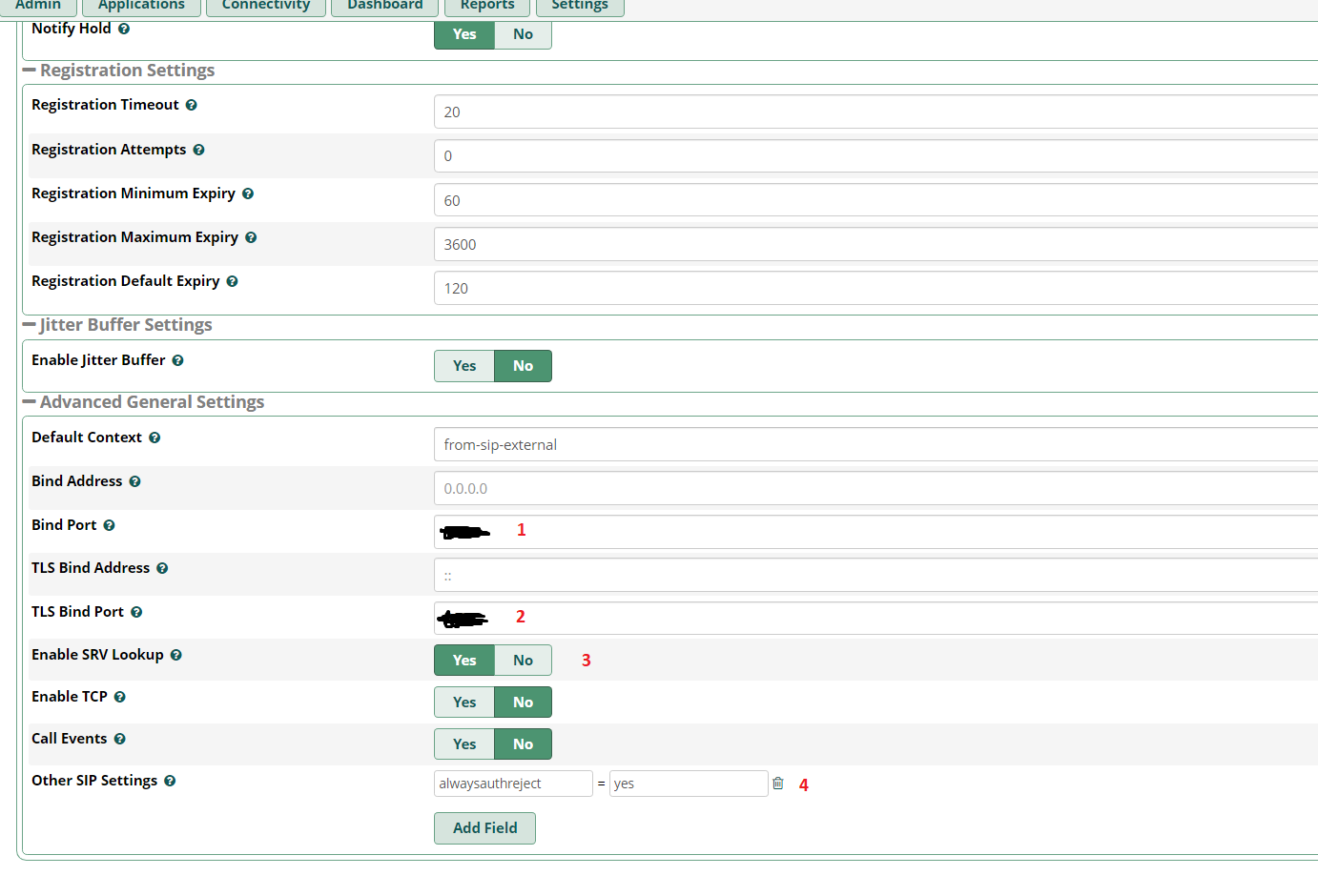
PJSIP, ( submit & apply config).
extension ( ):


, Submit & Apply config.
trunk :
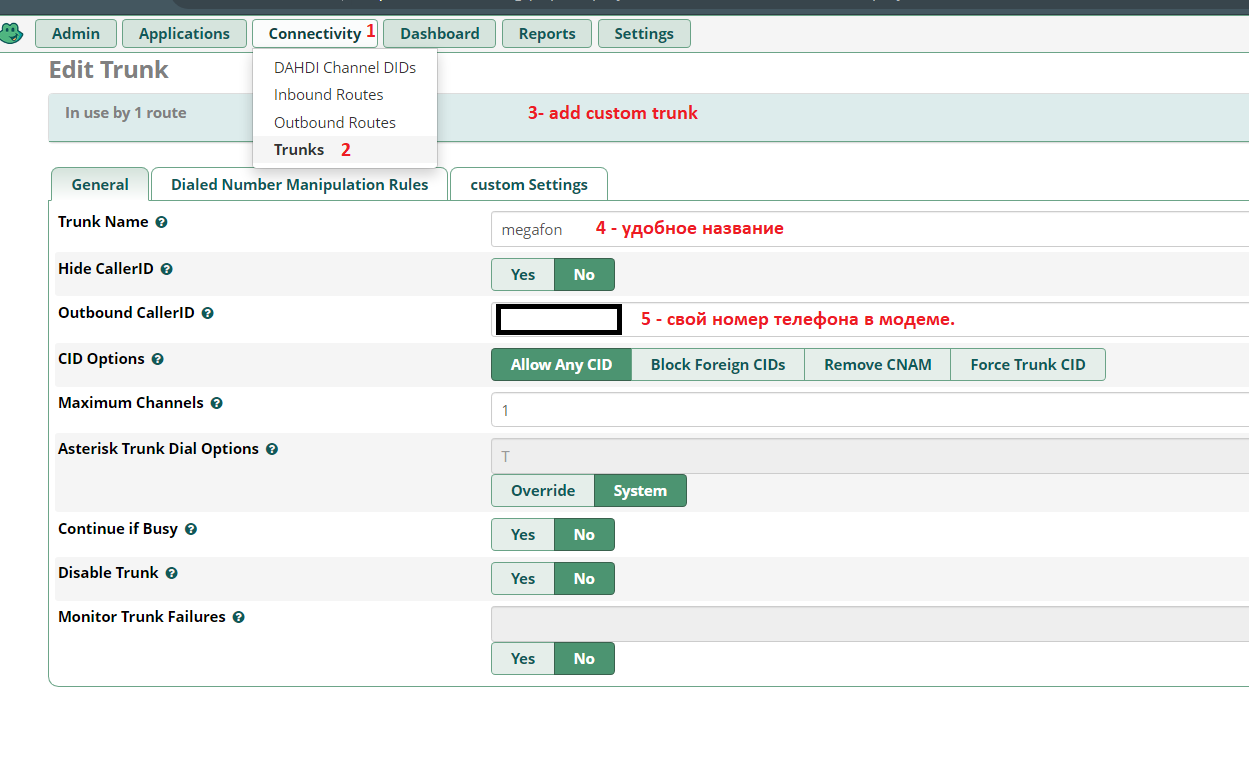


:

:


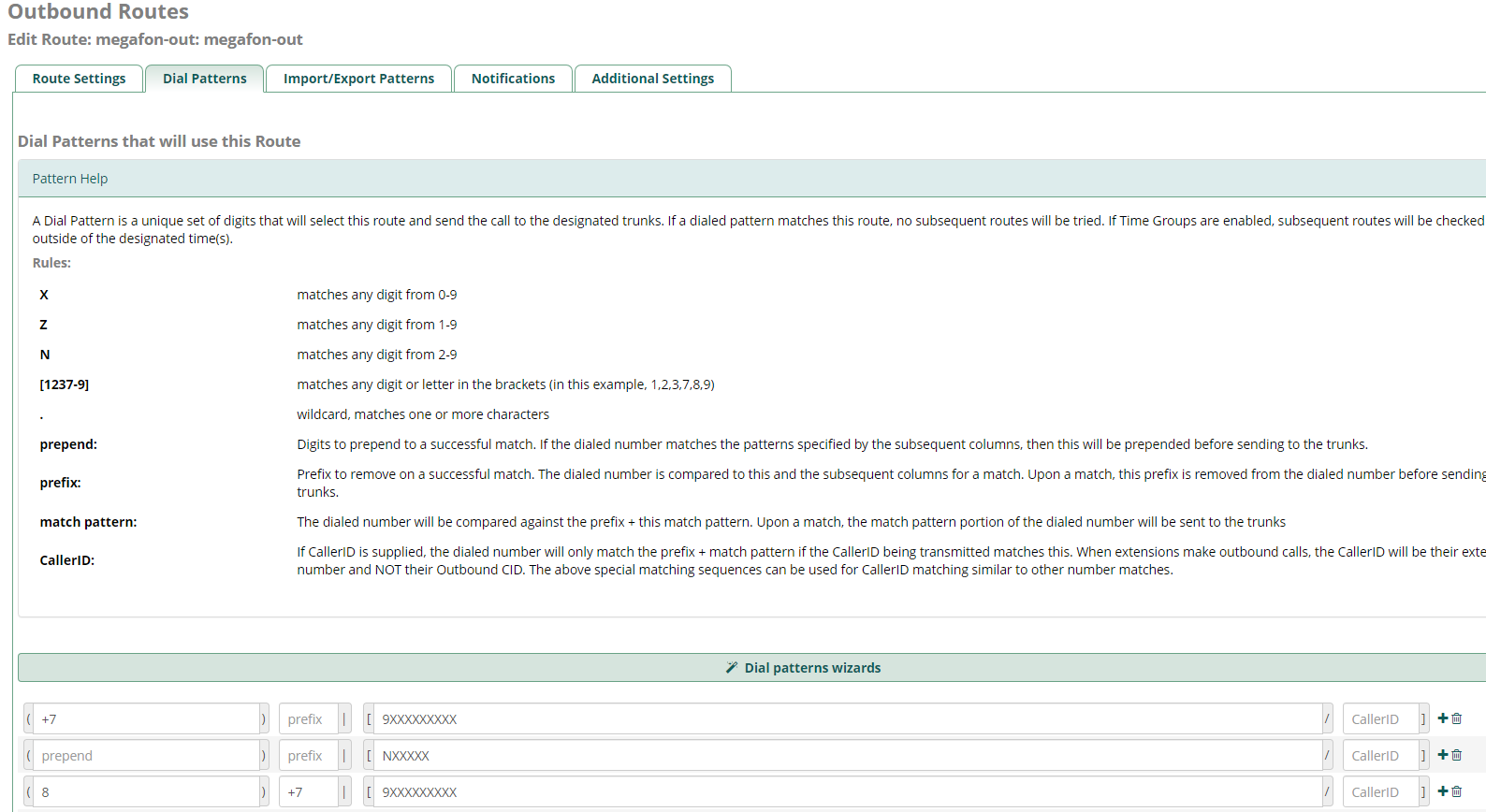
. Submit & Apply Config, .
GSM
:
:
GSM- « » ( AT^U2DIAG=0 ) 2G (AT^SYSCFG=13,1,3fffffff,0,0 ) Putty , raspberry, .
E171 -
E1550 -
E150 -
E3131 - ,
E352 -
GSM- HUAWEI E1550, ttyUSB*:
ls -al /dev | grep ttyUSB
crw-rw---- 1 root dialout 188, 0 27 11:34 ttyUSB0
crw-rw---- 1 root dialout 188, 1 27 11:33 ttyUSB1
crw-rw---- 1 root dialout 188, 2 27 12:37 ttyUSB2
GSM-, Asterisk , asterisk dialout. (nano /etc/udev/rules.d/92-dongle.rules) :
KERNEL=="ttyUSB*", MODE="0666", OWNER="asterisk", GROUP="dialout" |
raspberry reboot Putty.
dongle.conf ( nano /etc/asterisk/dongle.conf ) - exten imei , :
initstate=start ; specified initial state of device, must be one of 'stop' 'start' 'remote'
; 'remove' same as 'disable=yes'
exten=+79234567890 ; ,
dtmf=relax ; control of incoming DTMF detection, possible values:
; off - off DTMF tones detection, voice data passed to asterisk unalte$
; use this value for gateways or if not use DTMF for AVR or in$
; inband - do DTMF tones detection
; relax - like inband but with relaxdtmf option
; default is 'relax' by compatibility reason
; dongle required settings
[dongle0]
audio=/dev/ttyUSB1 ; tty port for audio connection; no default value
data=/dev/ttyUSB2 ; tty port for AT commands; no default value
imei=351234567898991 ; IMEI
;imsi=123456789012345
asterisk, chan_dongle . , GSM- asterisk:
root@raspbx:/# asterisk -rv
raspbx*CLI> dongle show devices
ID Group State RSSI Mode Submode Provider Name Model Firmware IMEI IMSI Number
dongle0 0 Free 26 3 3 MegaFon E1550 11.608.14.15.311 35******* 2**************3 Unknown
( extension) :
nano /etc/asterisk/extensions_custom.conf
[from-trunk-dongle]
; , sms.txt,
;exten => sms,1,Verbose(Incoming SMS from ${CALLERID(num)} ${BASE64_DECODE(${SMS_BASE64})})
;exten => sms,n,Set(FILE(/var/log/asterisk/sms.txt,,,a)=${STRFTIME(${EPOCH},,%Y-%m-%d %H:%M:%S)} - ${DONGLE$
;exten => sms,n,System(echo >> /var/log/asterisk/sms.txt)
;exten => sms,n,Hangup()
exten => _.,1,Set(CALLERID(name)=${CALLERID(num)})
exten => _.,n,Goto(from-trunk,${EXTEN},1)
; ,
exten => sms,1,Set(MESSAGE(body)=${BASE64_DECODE(${SMS_BASE64})})
exten => sms,n,System(echo '${STRFTIME(${EPOCH},,%Y-%m-%d %H:%M:%S)} - ${DONGLENAME} - ${CALLERID(num)}: ${$
exten => sms,n,Set(MESSAGE(from)="${CALLERID(num)}" <${CALLERID(num)}>)
exten => sms,n,Set(CALLERID(name)=${CALLERID(num)})
exten => sms,n,Verbose(1,${MESSAGE(from)})
exten => sms,n,MessageSend(sip:250,${MESSAGE(from)}) ; - 250
exten => sms,n,Hangup()
exten => ussd,1,Verbose(Incoming USSD: ${BASE64_DECODE(${USSD_BASE64})})
exten => ussd,n,System(echo '${STRFTIME(${EPOCH},,%Y-%m-%d %H:%M:%S)} - ${DONGLENAME}: ${BASE64_DECODE(${US$
exten => ussd,n,Hangup()
, , ( ) . .
Bluetooth , , , ( , - , ).
asterisk freepbx fail2ban (By @UKVoIPForums )
, :
install-fail2ban
:
sudo nano /etc/fail2ban/jail.local
jail.local
[DEFAULT]
# "ignoreip" can be an IP address, a CIDR mask or a DNS host. Fail2ban will not
# ban a host which matches an address in this list. Several addresses can be
# defined using space separator.
ignoreip = 127.0.0.1/8 ::1
[asterisk]
enabled = true
filter = asterisk
action = iptables-asterisk[name=asterisk]
logpath = /var/log/asterisk/security_log
bantime = 31536000
findtime = 86400
maxretry = 3
[sshd]
enabled = true
port = ssh
filter = sshd
logpath = /var/log/auth.log
banaction = iptables-allports
bantime = 31536000
findtime = 86400
maxretry = 3
[freepbx]
enabled = true
port = http,https
filter = freepbx
logpath = /var/log/asterisk/freepbx_security.log
bantime = 31536000
findtime = 86400
maxretry = 3
6 /, :
sudo nano /etc/fail2ban/filter.d/freepbx.conf
1. freepbx.conf
[INCLUDES]
before = common.conf
[Definition]
datepattern = ^\[%%Y-%%b-%%d %%H:%%M:%%S\]
failregex = \[freepbx_security\.NOTICE\]: Authentication failure for .* from <HOST>
sudo nano /etc/fail2ban/filter.d/asterisk.conf
2. asterisk.conf,
# Fail2Ban configuration file
#
#
# $Revision: 251 $
#
[INCLUDES]
# Read common prefixes. If any customizations available -- read them from
# common.local
before = common.conf
[Definition]
#_daemon = asterisk
# Option: failregex
# Notes.: regex to match the password failures messages in the logfile. The
# host must be matched by a group named "host". The tag "<HOST>" can
# be used for standard IP/hostname matching and is only an alias for
# (?:::f{4,6}:)?(?P<host>\S+)
# Values: TEXT
#
# Asterisk 1.8 uses Host:Port format which is reflected here
failregex = NOTICE.* .*: Registration from '.*' failed for '<HOST>:.*' - Wrong password
NOTICE.* .*: Registration from '.*' failed for '<HOST>:.*' - No matching peer found
NOTICE.* .*: Registration from '.*' failed for '<HOST>:.*' - Username/auth name mismatch
NOTICE.* .*: Registration from '.*' failed for '<HOST>:.*' - Device does not match ACL
NOTICE.* .*: Registration from '.*' failed for '<HOST>:.*' - Peer is not supposed to register
NOTICE.* .*: Registration from '.*' failed for '<HOST>:.*' - ACL error (permit/deny)
NOTICE.* .*: Registration from '.*' failed for '<HOST>:.*' - Device does not match ACL
NOTICE.* .*: Registration from '\".*\".*' failed for '<HOST>:.*' - No matching peer found
NOTICE.* .*: Registration from '\".*\".*' failed for '<HOST>:.*' - Wrong password
NOTICE.* <HOST> failed to authenticate as '.*'$
NOTICE.* .*: No registration for peer '.*' \(from <HOST>\)
NOTICE.* .*: Host <HOST> failed MD5 authentication for '.*' (.*)
NOTICE.* .*: Failed to authenticate user .*@<HOST>.*
NOTICE.* .*: <HOST> failed to authenticate as '.*'
NOTICE.* .*: <HOST> tried to authenticate with nonexistent user '.*'
SECURITY.* .*: SecurityEvent="ChallengeSent",.*,.*,Service="(PJ)?SIP",.*,AccountID="<unknown>",.*,.*,RemoteAddress=".*/.*/<HOST>/.*",Challenge=""
SECURITY.* .*: SecurityEvent="InvalidAccountID",.*,Severity="Error",Service="(PJ)?SIP",.*,.*,.*,.*,RemoteAddress=".*/.*/<HOST>/.*"
SECURITY.* .*: SecurityEvent="ChallengeResponseFailed",.*,Severity="Error",Service="(PJ)?SIP",.*,.*,.*,.*,RemoteAddress=".*/.*/<HOST>/.*",.*
SECURITY.* .*: SecurityEvent="InvalidPassword",.*,Severity="Error",Service="(PJ)?SIP",.*,.*,.*,.*,RemoteAddress=".*/.*/<HOST>/.*",.*
# Option: ignoreregex
# Notes.: regex to ignore. If this regex matches, the line is ignored.
# Values: TEXT
#
sudo nano /etc/fail2ban/action.d/iptables-asterisk.conf
3. iptables-asterisk.conf ( , SIP)
# Fail2Ban configuration file
#
# Author: Razvan Turtureanu
#
# $Revision$
#
[Definition]
# Option: actionstart
# Notes.: command executed once at the start of Fail2Ban.
# Values: CMD
#
actionstart = iptables -N fail2ban-<name>
iptables -A fail2ban-<name> -j RETURN
iptables -I <chain> -p tcp --dport 5061 -j fail2ban-<name>
iptables -I <chain> -p udp --dport 5060 -j fail2ban-<name>
iptables -I <chain> -p tcp --dport 5060 -j fail2ban-<name>
# Option: actionstop
# Notes.: command executed once at the end of Fail2Ban
# Values: CMD
#
actionstop = iptables -D <chain> -p tcp --dport 5061 -j fail2ban-<name>
iptables -D <chain> -p udp --dport 5060 -j fail2ban-<name>
iptables -D <chain> -p tcp --dport 5060 -j fail2ban-<name>
iptables -F fail2ban-<name>
iptables -X fail2ban-<name>
# Option: actioncheck
# Notes.: command executed once before each actionban command
# Values: CMD
#
actioncheck = iptables -n -L <chain> | grep -q fail2ban-<name>
# Option: actionban
# Notes.: command executed when banning an IP. Take care that the
# command is executed with Fail2Ban user rights.
# Tags: <ip> IP address
# <failures> number of failures
# <time> unix timestamp of the ban time
# Values: CMD
#
actionban = iptables -I fail2ban-<name> 1 -s <ip> -j DROP
# Option: actionunban
# Notes.: command executed when unbanning an IP. Take care that the
# command is executed with Fail2Ban user rights.
# Tags: <ip> IP address
# <failures> number of failures
# <time> unix timestamp of the ban time
# Values: CMD
#
actionunban = iptables -D fail2ban-<name> -s <ip> -j DROP
[Init]
# Defaut name of the chain
#
name = default
# Option: chain
# Notes specifies the iptables chain to which the fail2ban rules should be
# added
# Values: STRING Default: INPUT
chain = INPUT
sudo nano /etc/asterisk/logger_logfiles_custom.conf
4. logger_logfiles_custom.conf
security_log => SECURITY,NOTICE
sudo nano /etc/logrotate.d/asterisk-security
5. asterisk-security
/var/log/asterisk/security_log {
weekly
missingok
rotate 4
size 2000k
sharedscripts
create 0664 asterisk asterisk
su asterisk asterisk
postrotate
/usr/sbin/invoke-rc.d asterisk logger-reload > /dev/null 2> /dev/null
endscript
}
sudo nano /etc/logrotate.d/freepbx-security
6. freepbx-security
/var/log/asterisk/freepbx_security.log {
weekly
missingok
rotate 4
size 2000k
sharedscripts
create 0664 asterisk asterisk
su asterisk asterisk
postrotate
/usr/sbin/invoke-rc.d asterisk logger-reload > /dev/null 2> /dev/null
endscript
}
- reboot
fail2ban:
File permissions and owner/group information:
/etc/fail2ban/jail.local = rw-r--r-- root root
/etc/fail2ban/filter.d/freepbx.conf = rw-r--r-- root root
/etc/fail2ban/filter.d/asterisk.conf = rw-r--r-- root root
/etc/fail2ban/action.d/iptables-asterisk.conf = rw-r--r-- root root
/etc/asterisk/logger_logfiles_custom.conf = rw-rw-r-- asterisk asterisk
/etc/logrotate.d/asterisk_security = rw-r--r-- root root
Basic Fail2ban commands:
Start Fail2ban = sudo service fail2ban start
Stop Fail2ban = sudo service fail2ban stop
Restart Fail2ban = sudo service fail2ban restart
Get the current status of an individual jail:
FreePBX status = sudo fail2ban-client status freepbx
Asterisk status = sudo fail2ban-client status asterisk
SSHD status = sudo fail2ban-client status sshd
Ban/Unban IP addresses:
Ban IP = sudo fail2ban-client set *YOURJAILNAMEHERE banip IPADDRESSHERE
Unban IP = sudo fail2ban-client set *YOURJAILNAMEHERE unbanip IPADDRESSHERE
*Replace YOURJAILNAMEHERE with freepbx, asterisk or sshd.
*Replace IPADDRESSHERE with the IP address that you want to ban/unban.
Mikrotik
.
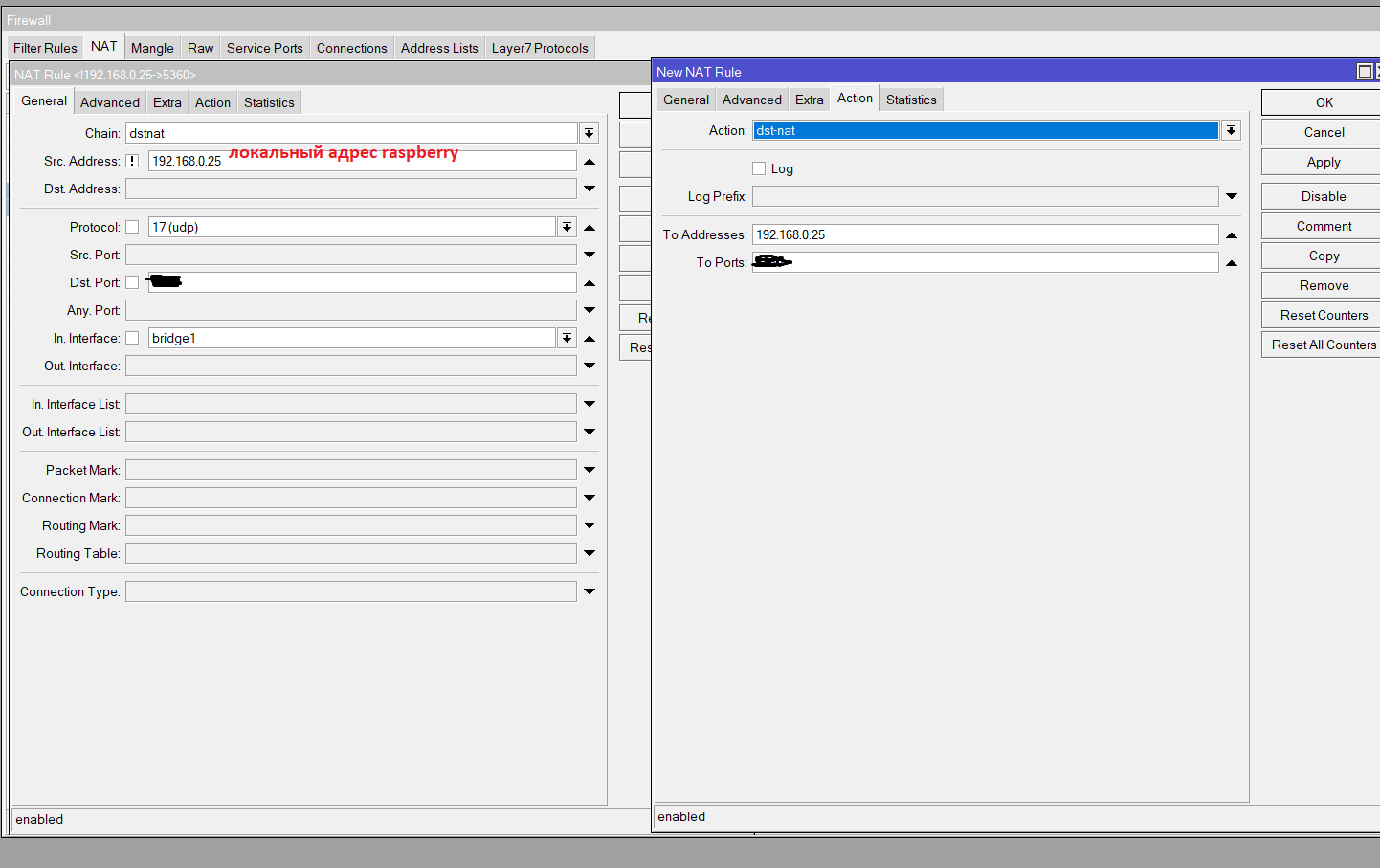
IP-Firewall- :
. tcp, 22,3389,8291


NAT (, SIP FreePBX), RTP

スケジュールに従ってシステムを自動モードで再起動し、フリーズしたモデムをリセットすることも可能/望ましいです。5日間の作業後にシステムがフリーズし、隣に誰もいなかったので、手動でオーバーロードする必要がありました。
crontab -e
# ( 5 )
0 5 * * * /sbin/reboot
ランダムに禁止された加入者のアドレスで緊急事態を処理するために、インターネットからMikrotikへのVPNアクセスを設定することをお勧めします。
長い間、私はこの作業指示をさまざまなソースから収集しました。多分誰かが助けてくれるでしょう。