この記事では、RecyclerViewとMotionLayoutに基づいて美しいアニメーションリストを作成する方法を説明し、紹介します。私は自分のプロジェクトの1つで同様の方法を使用しました。
翻訳者から:記事の著者のリポジトリはhttps://github.com/mjmanaog/foodbuddyです。
私はそれを翻訳するためにフォークしました。おそらく「ロシア語版」はもっと誰かに合うでしょう。
MotionLayoutとは何ですか?
つまり、MotionLayoutはConstraintLayoutサブクラスであり、XMLを使用してその上にある要素の動きとアニメーションを記述できます。詳細-ドキュメントとここに例があります。
それでは、始めましょう。
ステップ1:新しいプロジェクトを作成する
好きなように呼ぼう。アクティビティとして[空のアクティビティ]を選択します。
ステップ2:必要な依存関係を追加する
アプリケーションのgradleファイルに追加します。
implementation 'androidx.constraintlayout:constraintlayout:2.0.0-beta1'
そして、同期を開始しましょう(右上隅にある[今すぐ同期])。
ステップ3:レイアウトを作成する
今後のリストアイテムは次のようになります。
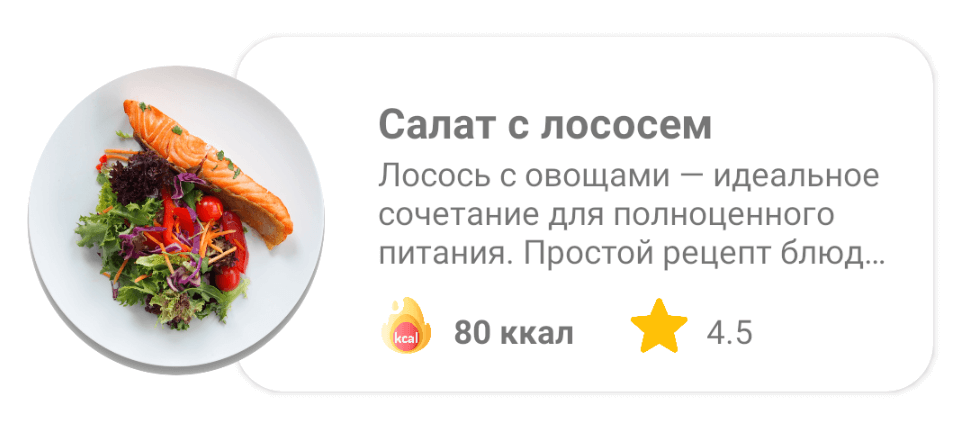
res/layout item_food.
<?xml version="1.0" encoding="utf-8"?>
<androidx.constraintlayout.widget.ConstraintLayout xmlns:android="http://schemas.android.com/apk/res/android"
xmlns:app="http://schemas.android.com/apk/res-auto"
xmlns:tools="http://schemas.android.com/tools"
android:id="@+id/clMain"
android:layout_width="match_parent"
android:layout_height="wrap_content"
app:layoutDescription="@xml/item_food_scene">
<ImageView
android:id="@+id/ivFood"
android:layout_width="150dp"
android:layout_height="150dp"
android:layout_marginTop="8dp"
android:elevation="10dp"
android:scaleType="fitXY"
app:layout_constraintBottom_toBottomOf="parent"
app:layout_constraintStart_toStartOf="parent"
app:layout_constraintTop_toTopOf="parent"
app:srcCompat="@drawable/img_salmon_salad" />
<androidx.cardview.widget.CardView
android:id="@+id/cardView"
android:layout_width="match_parent"
android:layout_height="150dp"
android:layout_marginStart="100dp"
android:layout_marginLeft="100dp"
android:layout_marginTop="16dp"
android:layout_marginEnd="16dp"
android:layout_marginRight="16dp"
android:layout_marginBottom="16dp"
app:cardCornerRadius="20dp"
app:layout_constraintBottom_toBottomOf="parent"
app:layout_constraintEnd_toEndOf="parent"
app:layout_constraintStart_toStartOf="parent"
app:layout_constraintTop_toTopOf="parent">
<androidx.constraintlayout.widget.ConstraintLayout
android:layout_width="match_parent"
android:layout_height="match_parent">
<TextView
android:id="@+id/tvTitle"
android:layout_width="0dp"
android:layout_height="wrap_content"
android:layout_marginStart="60dp"
android:layout_marginLeft="60dp"
android:layout_marginTop="24dp"
android:layout_marginEnd="8dp"
android:layout_marginRight="8dp"
android:textSize="18sp"
android:textStyle="bold"
app:layout_constraintEnd_toEndOf="parent"
app:layout_constraintStart_toStartOf="parent"
app:layout_constraintTop_toTopOf="parent"
tools:text=" " />
<TextView
android:id="@+id/tvDescription"
android:layout_width="0dp"
android:layout_height="wrap_content"
android:layout_marginStart="60dp"
android:layout_marginLeft="60dp"
android:layout_marginEnd="16dp"
android:layout_marginRight="8dp"
android:ellipsize="end"
android:maxLines="3"
app:layout_constraintEnd_toEndOf="parent"
app:layout_constraintStart_toStartOf="parent"
app:layout_constraintTop_toBottomOf="@+id/tvTitle"
tools:text=" — . , : , ." />
<TextView
android:id="@+id/tvCalories"
android:layout_width="wrap_content"
android:layout_height="wrap_content"
android:layout_marginStart="8dp"
android:layout_marginLeft="8dp"
android:layout_marginBottom="16dp"
android:textStyle="bold"
app:layout_constraintBottom_toBottomOf="parent"
app:layout_constraintStart_toEndOf="@+id/imageView6"
tools:text="80 " />
<ImageView
android:id="@+id/imageView6"
android:layout_width="24dp"
android:layout_height="24dp"
android:layout_marginStart="60dp"
android:layout_marginLeft="60dp"
android:layout_marginBottom="16dp"
app:layout_constraintBottom_toBottomOf="parent"
app:layout_constraintStart_toStartOf="parent"
app:srcCompat="@drawable/ic_calories" />
<ImageView
android:id="@+id/imageView7"
android:layout_width="24dp"
android:layout_height="24dp"
android:layout_marginStart="24dp"
android:layout_marginLeft="24dp"
android:layout_marginBottom="16dp"
app:layout_constraintBottom_toBottomOf="parent"
app:layout_constraintStart_toEndOf="@+id/tvCalories"
app:srcCompat="@drawable/ic_star" />
<TextView
android:id="@+id/tvRate"
android:layout_width="wrap_content"
android:layout_height="wrap_content"
android:layout_marginStart="8dp"
android:layout_marginLeft="8dp"
android:layout_marginBottom="16dp"
app:layout_constraintBottom_toBottomOf="parent"
app:layout_constraintStart_toEndOf="@+id/imageView7"
tools:text="4.5" />
</androidx.constraintlayout.widget.ConstraintLayout>
</androidx.cardview.widget.CardView>
</androidx.constraintlayout.widget.ConstraintLayout>
4: ConstraintLayout MotionLayout
ConstraintLayout MotionLayout:
Split Design;
(Component Tree) ( — clMain);
Convert to MotionLayout.
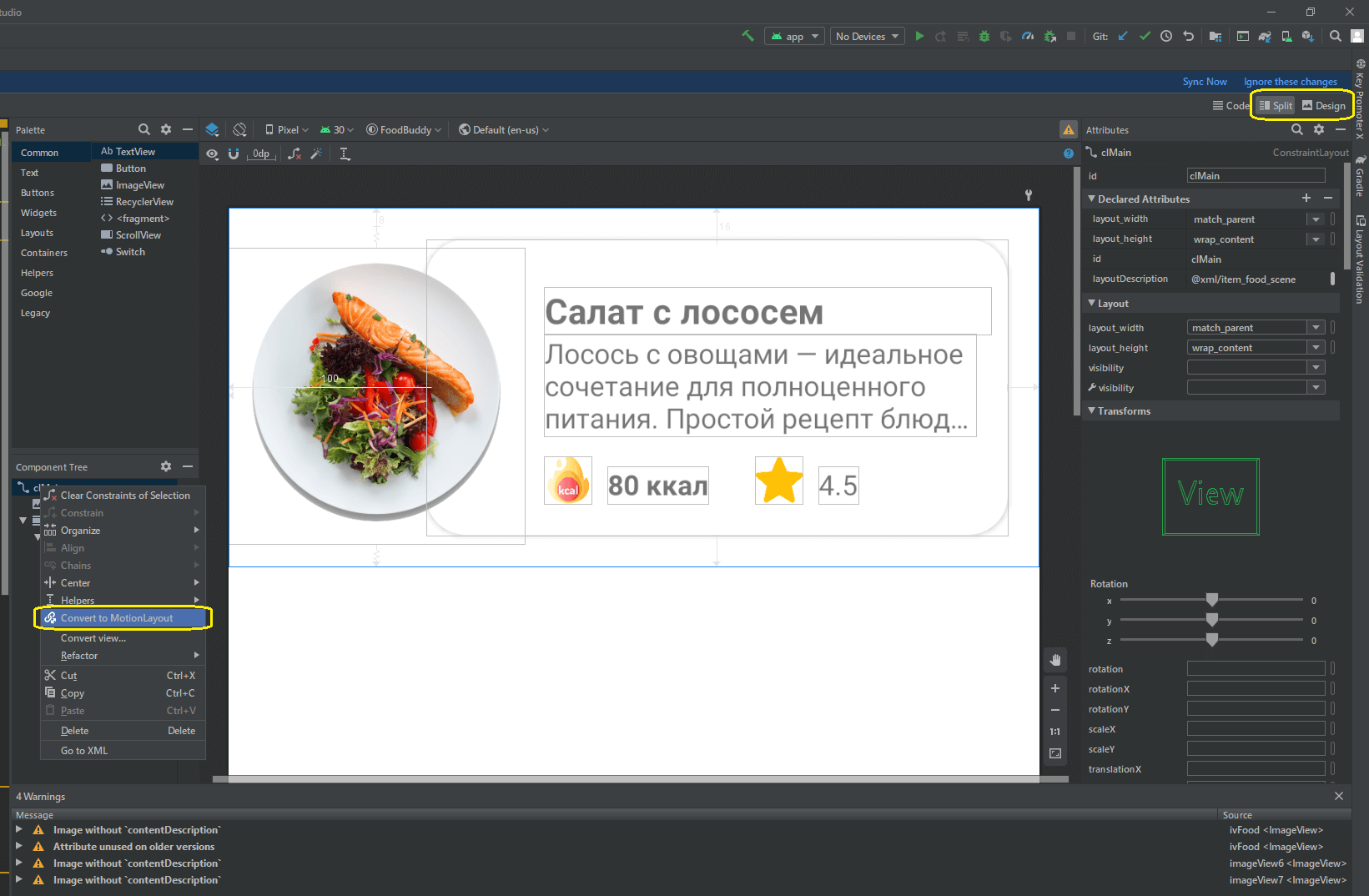
MotionLayout.
item_food
<?xml version="1.0" encoding="utf-8"?>
<androidx.constraintlayout.motion.widget.MotionLayout xmlns:android="http://schemas.android.com/apk/res/android"
xmlns:app="http://schemas.android.com/apk/res-auto"
xmlns:tools="http://schemas.android.com/tools"
android:id="@+id/clMain"
android:layout_width="match_parent"
android:layout_height="wrap_content"
app:layoutDescription="@xml/item_food_scene">
<ImageView
android:id="@+id/ivFood"
android:layout_width="150dp"
android:layout_height="150dp"
android:layout_marginTop="8dp"
android:elevation="10dp"
android:scaleType="fitXY"
app:layout_constraintBottom_toBottomOf="parent"
app:layout_constraintStart_toStartOf="parent"
app:layout_constraintTop_toTopOf="parent"
app:srcCompat="@drawable/img_salmon_salad" />
<androidx.cardview.widget.CardView
android:id="@+id/cardView"
android:layout_width="match_parent"
android:layout_height="150dp"
android:layout_marginStart="100dp"
android:layout_marginLeft="100dp"
android:layout_marginTop="16dp"
android:layout_marginEnd="16dp"
android:layout_marginRight="16dp"
android:layout_marginBottom="16dp"
app:cardCornerRadius="20dp"
app:layout_constraintBottom_toBottomOf="parent"
app:layout_constraintEnd_toEndOf="parent"
app:layout_constraintStart_toStartOf="parent"
app:layout_constraintTop_toTopOf="parent">
<androidx.constraintlayout.widget.ConstraintLayout
android:layout_width="match_parent"
android:layout_height="match_parent">
<TextView
android:id="@+id/tvTitle"
android:layout_width="0dp"
android:layout_height="wrap_content"
android:layout_marginStart="60dp"
android:layout_marginLeft="60dp"
android:layout_marginTop="24dp"
android:layout_marginEnd="8dp"
android:layout_marginRight="8dp"
android:textSize="18sp"
android:textStyle="bold"
app:layout_constraintEnd_toEndOf="parent"
app:layout_constraintStart_toStartOf="parent"
app:layout_constraintTop_toTopOf="parent"
tools:text=" " />
<TextView
android:id="@+id/tvDescription"
android:layout_width="0dp"
android:layout_height="wrap_content"
android:layout_marginStart="60dp"
android:layout_marginLeft="60dp"
android:layout_marginEnd="16dp"
android:layout_marginRight="8dp"
android:ellipsize="end"
android:maxLines="3"
app:layout_constraintEnd_toEndOf="parent"
app:layout_constraintStart_toStartOf="parent"
app:layout_constraintTop_toBottomOf="@+id/tvTitle"
tools:text=" — . , : , ." />
<TextView
android:id="@+id/tvCalories"
android:layout_width="wrap_content"
android:layout_height="wrap_content"
android:layout_marginStart="8dp"
android:layout_marginLeft="8dp"
android:layout_marginBottom="16dp"
android:textStyle="bold"
app:layout_constraintBottom_toBottomOf="parent"
app:layout_constraintStart_toEndOf="@+id/imageView6"
tools:text="80 " />
<ImageView
android:id="@+id/imageView6"
android:layout_width="24dp"
android:layout_height="24dp"
android:layout_marginStart="60dp"
android:layout_marginLeft="60dp"
android:layout_marginBottom="16dp"
app:layout_constraintBottom_toBottomOf="parent"
app:layout_constraintStart_toStartOf="parent"
app:srcCompat="@drawable/ic_calories" />
<ImageView
android:id="@+id/imageView7"
android:layout_width="24dp"
android:layout_height="24dp"
android:layout_marginStart="24dp"
android:layout_marginLeft="24dp"
android:layout_marginBottom="16dp"
app:layout_constraintBottom_toBottomOf="parent"
app:layout_constraintStart_toEndOf="@+id/tvCalories"
app:srcCompat="@drawable/ic_star" />
<TextView
android:id="@+id/tvRate"
android:layout_width="wrap_content"
android:layout_height="wrap_content"
android:layout_marginStart="8dp"
android:layout_marginLeft="8dp"
android:layout_marginBottom="16dp"
app:layout_constraintBottom_toBottomOf="parent"
app:layout_constraintStart_toEndOf="@+id/imageView7"
tools:text="4.5" />
</androidx.constraintlayout.widget.ConstraintLayout>
</androidx.cardview.widget.CardView>
</androidx.constraintlayout.motion.widget.MotionLayout>
res xml item_food_scene.xml:
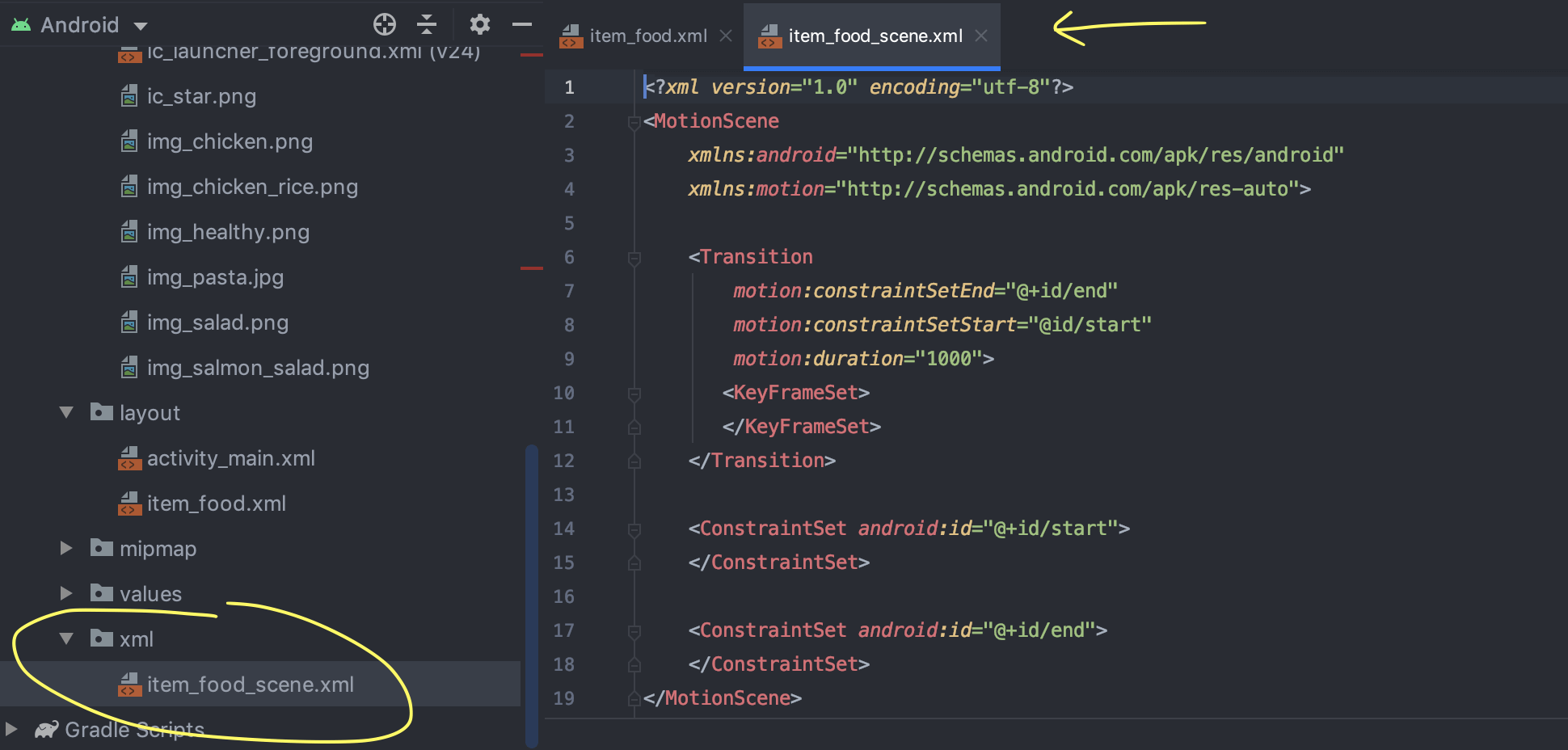
(Warnings ), ImageView contentDescription. , XML- ( , ).
5: ImageView

ivFood (ImageView );
MotionLayout end;
ivFood (End) (End) ;
;
layout_height layout_width 300dp.
: ImageView ( , ) , : ( 150dp 300dp).
6: ,
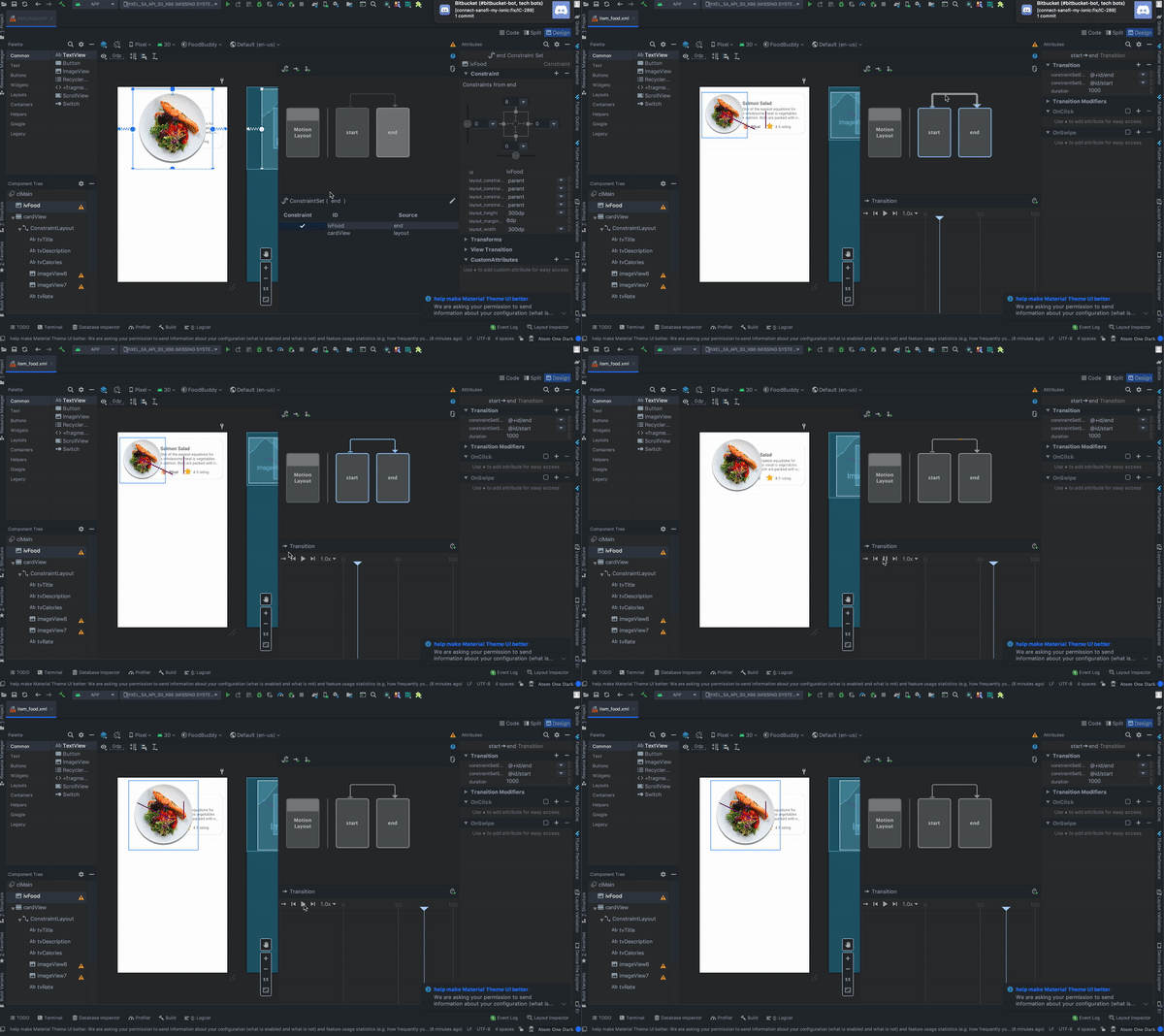
, :
MotionLayout , start end;
Transition;
Play, .
7: CardView
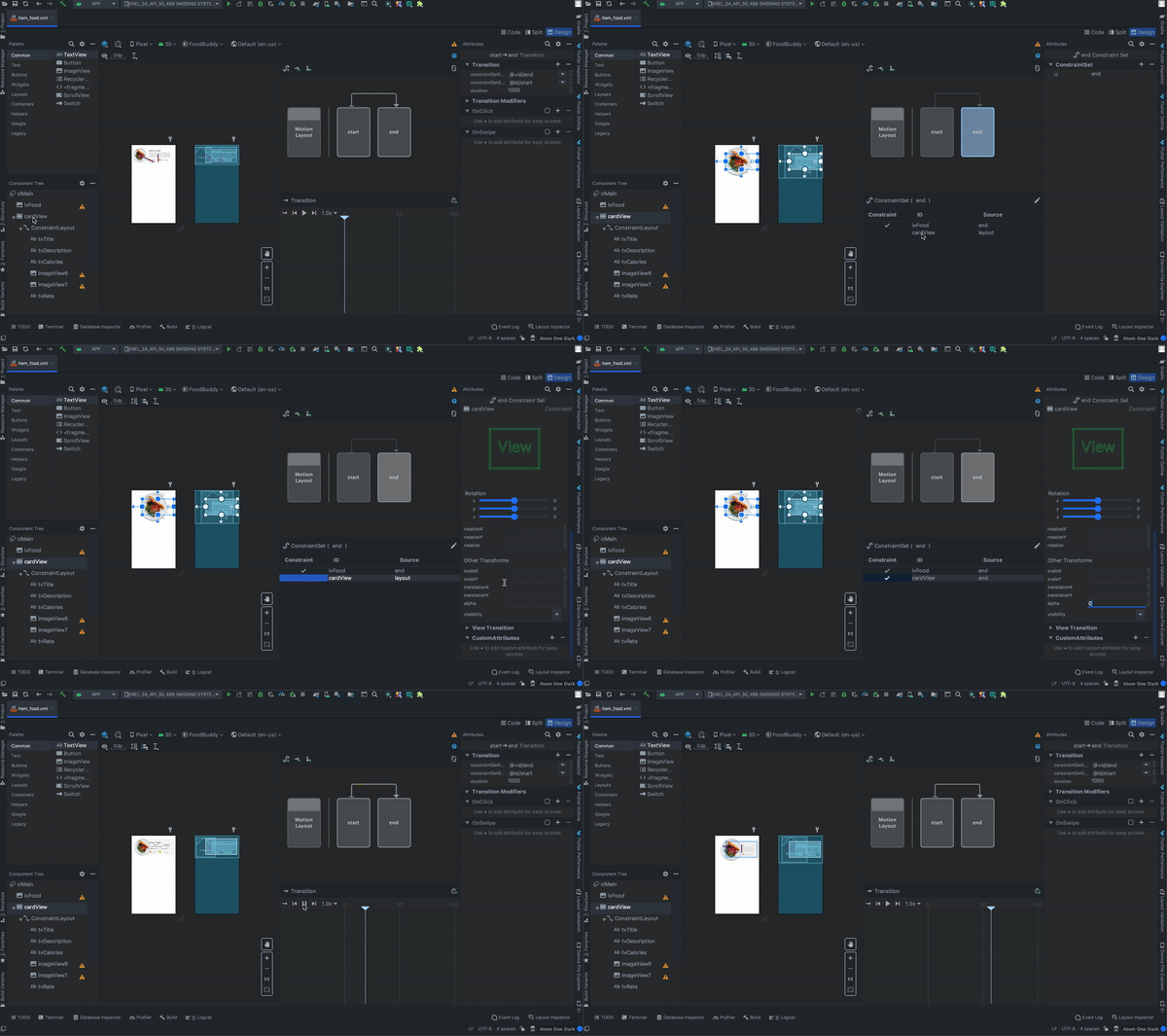
:
cardView (constraintView , , );
MotionLayout end;
cardView ConstraintSet;
Transforms;
alpha 0.
: (end) (start) alpha. ( ).
8:
, :
OnClick ( «+»);
targetId ivFood;
;
ClickAction toggle.
:
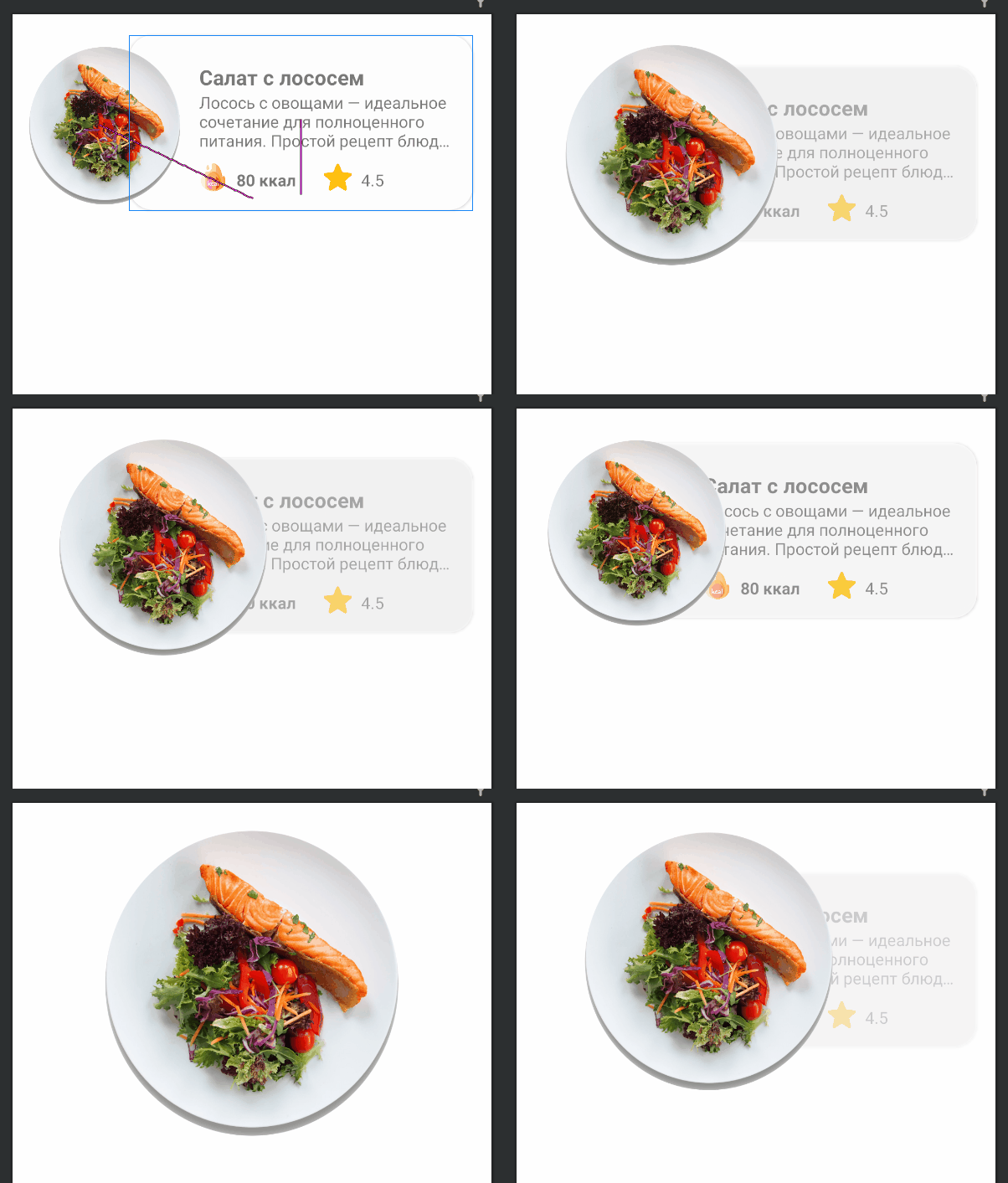
9: RecyclerView activity_main.xml
<?xml version="1.0" encoding="utf-8"?>
<androidx.constraintlayout.widget.ConstraintLayout xmlns:android="http://schemas.android.com/apk/res/android"
xmlns:app="http://schemas.android.com/apk/res-auto"
android:layout_width="match_parent"
android:layout_height="match_parent">
<androidx.recyclerview.widget.RecyclerView
android:id="@+id/rvMain"
android:layout_width="match_parent"
android:layout_height="match_parent"
app:layout_constraintBottom_toBottomOf="parent"
app:layout_constraintEnd_toEndOf="parent"
app:layout_constraintStart_toStartOf="parent"
app:layout_constraintTop_toTopOf="parent" />
</androidx.constraintlayout.widget.ConstraintLayout>
10:
package com.mjmanaog.foodbuddy.data.model
import com.mjmanaog.foodbuddy.R
data class FoodModel(
val title: String,
val description: String,
val calories: String,
val rate: String,
val imgId: Int
)
val foodDummyData: ArrayList<FoodModel> = arrayListOf(
FoodModel(
" ",
" — . , : , .",
"80 ",
"4.5",
R.drawable.img_salmon_salad
),
FoodModel(
" -",
" , , .",
"80 ",
"4.5",
R.drawable.img_chicken
),
FoodModel(
" ",
" — . , . .",
"80 ",
"4.5",
R.drawable.img_chicken_rice
),
FoodModel(
" ",
" , ( ), , , , , , , .",
"80 ",
"4.5",
R.drawable.img_salad
),
FoodModel(
" ",
" — . , : , .",
"80 ",
"4.5",
R.drawable.img_healthy
)
)
11: ViewHolder
. FoodModel
12: RecyclerView
class MainActivity : AppCompatActivity() {
private var foodAdapter: FoodAdapter = FoodAdapter()
override fun onCreate(savedInstanceState: Bundle?) {
super.onCreate(savedInstanceState)
setContentView(R.layout.activity_main)
rvMain.layoutManager = LinearLayoutManager(this, RecyclerView.VERTICAL, false)
rvMain.adapter = foodAdapter
foodAdapter.addAll(foodDummyData)
}
}
これらの単純なアクションの結果として、次のアニメーションが得られました。
記事からGIFを追加しなかったのは、
彼女は11MBを持っています。
他の何か
item_food_scene.xmlファイルには、構成したアニメーションの説明が含まれています。シーンファイルのアニメーションを手動で作成および編集する必要はありません。
この記事の資料が誰かに役立つことを願っています。そこから何か新しいことを学べばかっこいいです。
清聴ありがとうございました。