この投稿では、YoomoneyAPIを使用してTelegramボットで支払いを受け入れる方法を学習します。
前書き
そもそも、最近テレグラムに電器店を作りたいと思いました。そして、私は仕事の時に既成の解決策がなかったという問題に遭遇しました。私は、個々の起業家やこのすべての動きなしで支払いを受け入れたかったのです。したがって、私の選択はQiwiとYoomoney(以前のYandex Money)のどちらかでした。私自身はベラルーシ出身です...したがって、Yoomoneyから「識別された」アカウントを取得する方が簡単です。
その結果、Python用のyoomoneyライブラリを作成しました。
この投稿が役に立った場合は、GitHubにスターを付けてください。とても嬉しいです!
説明
トークンを取得します
トークンを確認する
支払いの請求書を発行する方法
支払い確認
トークンを取得します
Yoomoney APIを使用するには、特別なトークンを取得する必要があります。まず、アプリケーションを登録します。
1.YuMoneyウォレットに移動します。ウォレットがない場合は 作成します。
2.アプリケーション登録 ページに移動します 。
3. アプリケーションパラメータを指定します。
4. [確認]ボタンをクリックします 。
, , (client_id) , , (client_secret).
!
client_id redirect_uri, .
: . .
pip install yoomoney
from yoomoney import Authorize
Authorize(
client_id="YOUR_CLIENT_ID",
redirect_uri="YOUR_REDIRECT_URI",
scope=["account-info",
"operation-history",
"operation-details",
"incoming-transfers",
"payment-p2p",
"payment-shop",
]
)
! !
YOUR_TOKEN :
from yoomoney import Client
token = "YOUR_TOKEN"
client = Client(token)
user = client.account_info()
print("Account number:", user.account)
print("Account balance:", user.balance)
print("Account currency code in ISO 4217 format:", user.currency)
print("Account status:", user.account_status)
print("Account type:", user.account_type)
print("Extended balance information:")
for pair in vars(user.balance_details):
print("\t-->", pair, ":", vars(user.balance_details).get(pair))
print("Information about linked bank cards:")
cards = user.cards_linked
if len(cards) != 0:
for card in cards:
print(card.pan_fragment, " - ", card.type)
else:
print("No card is linked to the account")
:
Account number: 410019014512803
Account balance: 999999999999.99
Account currency code in ISO 4217 format: 643
Account status: identified
Account type: personal
Extended balance information:
--> total : 999999999999.99
--> available : 999999999999.99
--> deposition_pending : None
--> blocked : None
--> debt : None
--> hold : None
Information about linked bank cards:
No card is linked to the account
! .
Quickpay.
from yoomoney import Quickpay
quickpay = Quickpay(
receiver="410019014512803",
quickpay_form="shop",
targets="Sponsor this project",
paymentType="SB",
sum=150,
)
print(quickpay.base_url)
print(quickpay.redirected_url)
:
https://yoomoney.ru/quickpay/confirm.xml?receiver=410019014512803&quickpay-form=shop&targets=Sponsor%20this%20project&paymentType=SB&sum=150
https://yoomoney.ru/transfer/quickpay?requestId=343532353937313933395f66326561316639656131626539326632616434376662373665613831373636393537613336383639
. . .
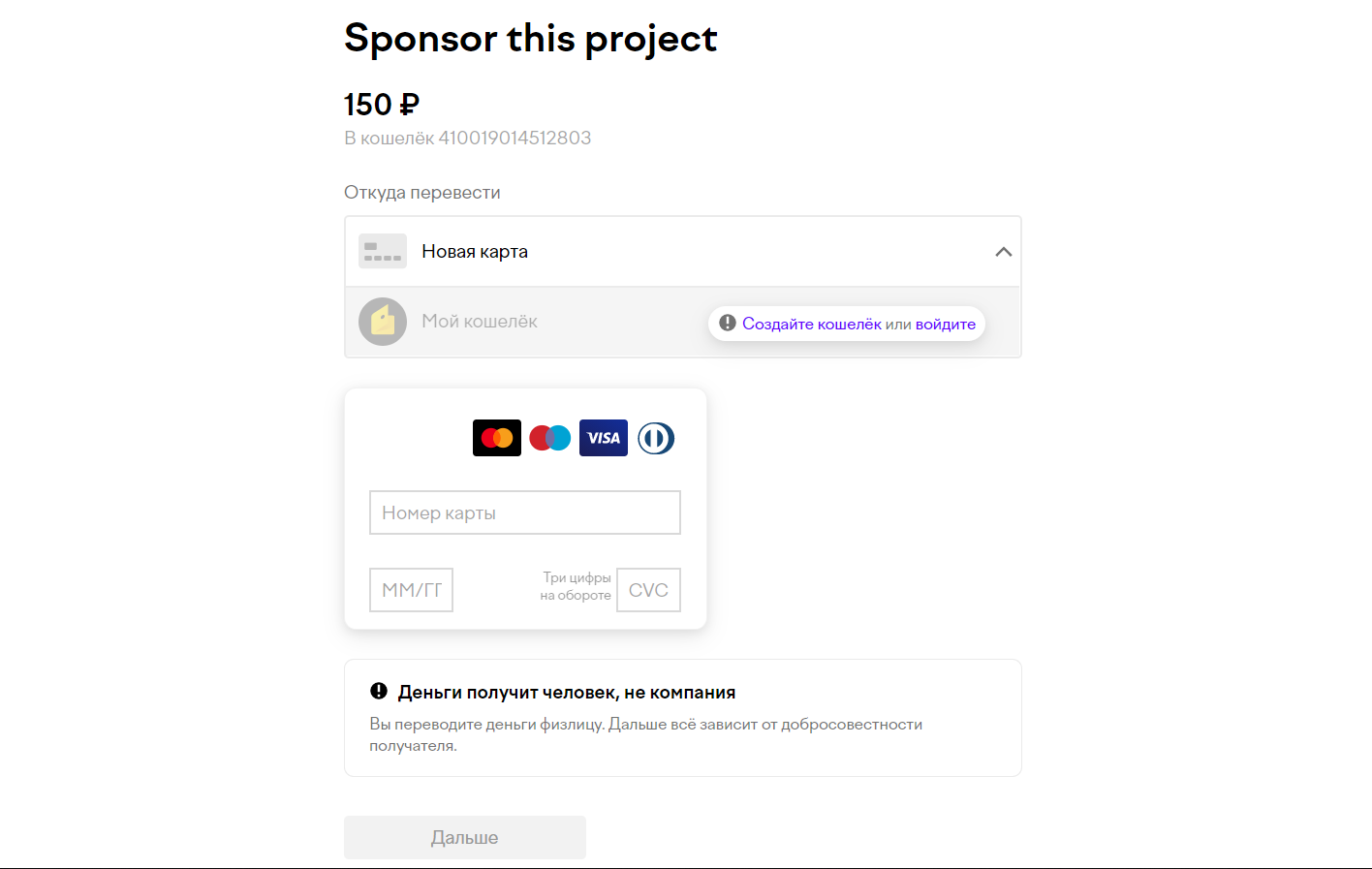
, .
: , ?
label - , . , .
:
from yoomoney import Quickpay
quickpay = Quickpay(
receiver="410019014512803",
quickpay_form="shop",
targets="Sponsor this project",
paymentType="SB",
sum=150,
lebel="a1b2c3d4e5"
)
print(quickpay.base_url)
print(quickpay.redirected_url)
.
Client.
トランザクションラベルがわかれば、ウォレットのトランザクション履歴をフィルタリングできます。client.operation_history()にラベルを付けるだけです。
from yoomoney import Client
token = "YOUR_TOKEN"
client = Client(token)
history = client.operation_history(label="a1b2c3d4e5")
print("List of operations:")
print("Next page starts with: ", history.next_record)
for operation in history.operations:
print()
print("Operation:",operation.operation_id)
print("\tStatus -->", operation.status)
print("\tDatetime -->", operation.datetime)
print("\tTitle -->", operation.title)
print("\tPattern id -->", operation.pattern_id)
print("\tDirection -->", operation.direction)
print("\tAmount -->", operation.amount)
print("\tLabel -->", operation.label)
print("\tType -->", operation.type)
その結果、フィルターのすべての操作のリストが得られます。
List of operations:
Next page starts with: None
Operation: 670278348725002105
Status --> success
Datetime --> 2021-10-10 10:10:10
Title --> ****4487
Pattern id --> None
Direction --> in
Amount --> 150.0
Label --> a1b2c3d4e5
Type --> deposition
これで、支払いが完了したかどうかがわかります。
すべて!支払いを受け取るために他に何も必要ありません。
結論
この投稿が役に立った場合は、GitHubにスターを付けてください。とても嬉しいです!