
記事「 HTML5キャンバス上の人工地平線のインジケーター」は、A.P。PlentsovとN.A.Zakonovoyの発明に基づいた管理対象オブジェクトのボリュームレイアウトを備えたインジケーターコードを示しています 。 ..。
ボリュームレイアウトを備えたインジケーターのアイデアの利点の1つは、その有効性です。今回は、珍しい人工地平線視覚化フォーマットがシステムに適応されます 拡張現実。
HUDとHDD
HUDデザイン機能
観測された現実への機器情報の追加は、パラメータ値の通常の表示とは著しく異なります。タスクの特異性は、HUDのビジュアルデザインに反映されてい ます。最も複雑で重要なシステム( たとえば、航空会社のパイロットの職場)では、原則として、「アウトライン」デザインでモノクロの緑色の表示が使用されます。 HUD
の最小限の設計は、 一連の競合するシステム要件に対する答えです。たとえば、輪郭要素は、外部空間の表示を妨げることなく、オペレーターが読み取るのに十分な角度寸法を持つことができます。
ソリューション要件
人工地平線インジケータークラスを開発するためのタスクの主要な規定を定義しましょう
。1。クラスコンストラクターには次の引数が必要です。
- インジケーターの面のサイズ。
- 表示されるロール値を制限します。
- 表示される最大ピッチ値。
2.各角度の表示限界は、表示値の絶対値を超えてはならない1つの値によって決定されます。制限値は90度を超えることはできません。
3.ピッチスケールには、角度を表す7つの数値マークが必要です。オブジェクトをインスタンス化するときにスケールのスケールを最適化する必要があります。次の条件が満たされている場合、表示される値の間隔は最小である必要があります:
- 上下のマークは30の倍数です。
- コンストラクターに渡されるピッチ角の最大値は、-1を掛けた場合を含め、スケールを超えません。

4.ロールスケールには、設計者に報告された最大ロール角度に関係なく、ダイヤルの全周に30度刻みでマークを付ける必要があります。ロールスケールマークは、レイアウトのピッチ位置を考慮して表示する必要があります。つまり、ダイヤルは、ダイヤルの中心を通る軸を中心としたピッチ角度だけ、作業場の対称面内で回転する必要があります。
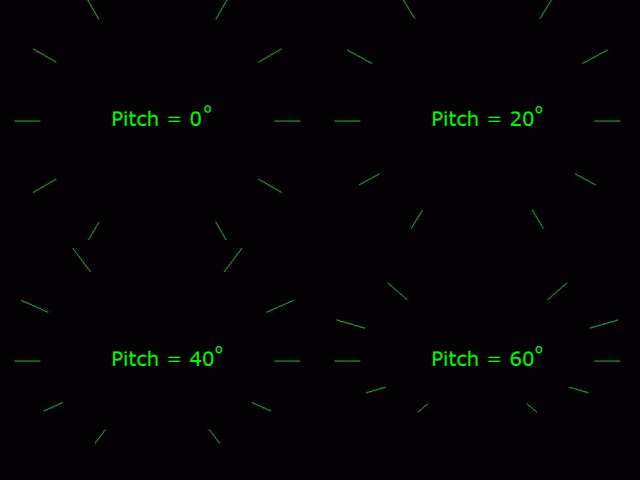
5.車両のモデルは、矢印の形をした平らな図形の形で作成する必要があります。レイアウトの幅に対する長さの比率は、画面領域の合理的な使用を保証する必要があります。たとえば、ピッチスケールが90度に制限されている場合、レイアウトの長さはその幅の約半分に対応する必要があります。スケールが30度に制限されると、図の右側に示すように、画面の高さのかなりの部分が使用されなくなります。

より小さな間隔でスケールを適切にスケーリングするには、レイアウトの比率を変更する必要があります。

6.クラスには、ロール角度とピッチ角度の現在の値を受け入れる更新関数が必要です。
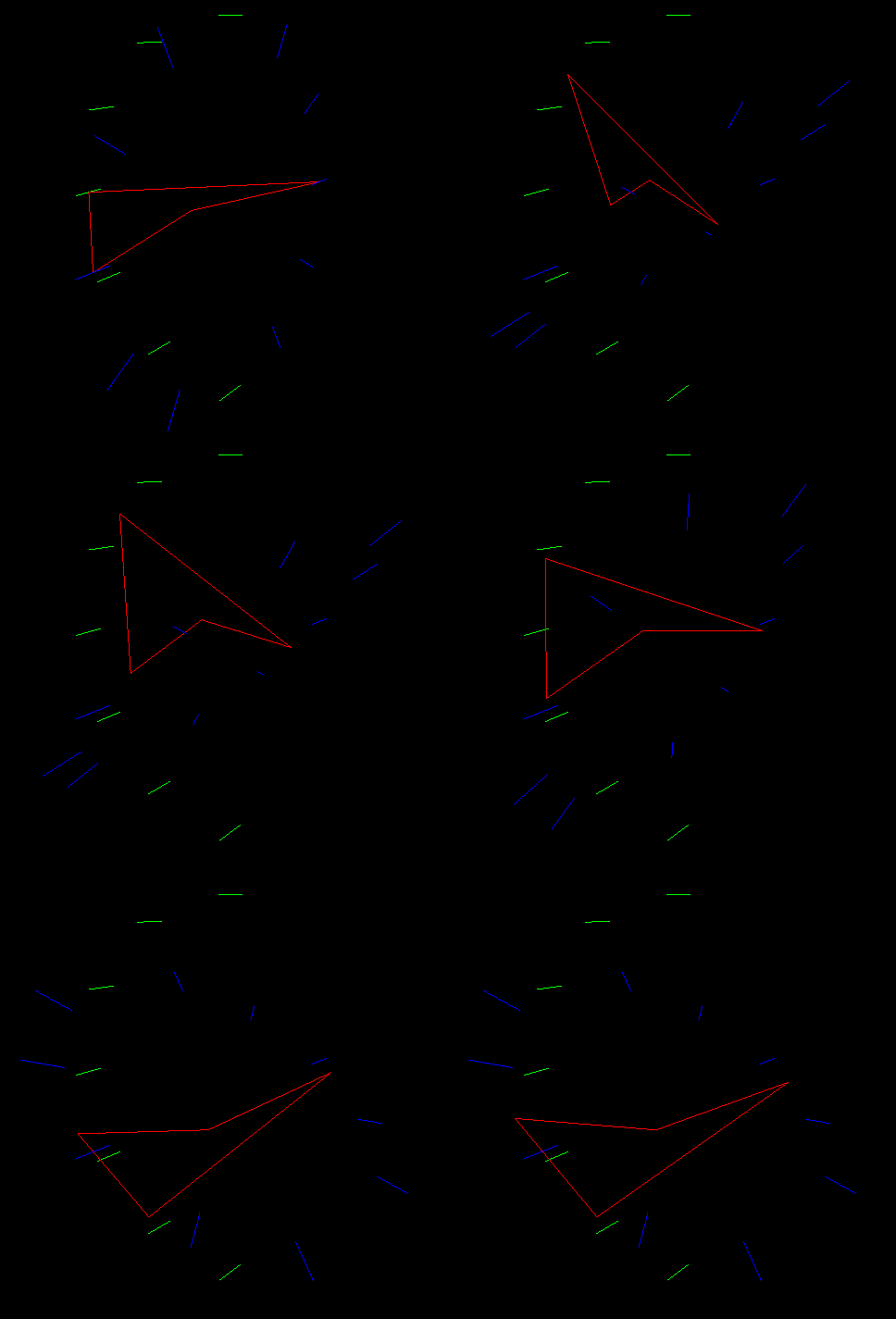
7.インジケーターは緑色で輪郭が描かれている必要があります。インジケーター要素の数はできるだけ少なくする必要があります。背景のアニメーションが引き続き表示されるようにする必要があります。
結果
結果のインジケーターは、githubページでインタラクティブに評価でき ます。
この例のオブジェクトは、常にその縦軸の方向に厳密に移動します。移動速度、ロール角、ピッチの値を設定することが可能です。進行角度の値は一定であるため、移動は垂直面でのみ実行されます。
インジケーターコード
人工地平線表示コードを以下に示します。Attitudeクラス はthree.jsライブラリを使用します 。
姿勢クラスコード
class Attitude {
constructor(camera, scene, radius, maxPitch, maxRoll) {
//:
// 30 :
if (maxPitch > 90) maxPitch = 90;
this.maxPitch = maxPitch;
maxPitch /= 30;
maxPitch = Math.ceil(maxPitch) * 30;
//:
if (maxRoll > 90) maxRoll = 90;
this.maxRoll = maxRoll;
// :
let skeletonLength = radius / Math.sin(maxPitch * Math.PI / 180);
// :
let geometry = new THREE.Geometry();
geometry.vertices.push(new THREE.Vector3(0, 0, -skeletonLength / 4));
geometry.vertices.push(new THREE.Vector3(-radius, 0, 0));
geometry.vertices.push(new THREE.Vector3(0, 0, -skeletonLength));
geometry.vertices.push(new THREE.Vector3(radius, 0, 0));
geometry.vertices.push(new THREE.Vector3(0, 0, -skeletonLength / 4)); //
// :
let material = new THREE.LineBasicMaterial({ color: 0x00ff00, linewidth: 1 });
// :
this.skeleton = new THREE.Line(geometry, material);
scene.add(this.skeleton);
// :
let pitchScaleStep = maxPitch / 3;
let textLabelsPos = [];//
for (let i = 0; i < 7; i++) {
let lineGeometry = new THREE.Geometry();
// :
let leftPoint = new THREE.Vector3(-radius / 10,
skeletonLength * Math.sin((maxPitch - pitchScaleStep * i) * Math.PI / 180),
-skeletonLength * Math.cos((maxPitch - pitchScaleStep * i) * Math.PI / 180));
let rightPoint = new THREE.Vector3();
rightPoint.copy(leftPoint);
rightPoint.x += (radius / 5);
// :
lineGeometry.vertices.push(leftPoint);
lineGeometry.vertices.push(rightPoint);
let line = new THREE.Line(lineGeometry, material);
scene.add(line);
//
let textPos = new THREE.Vector3();
textPos.copy(leftPoint);
textLabelsPos.push(textPos);
}
// :
let rollScaleStep = 30;
this.rollLines = [];
for (let i = 0; i < 12; i++) {
if (i != 3 && i != 9) {//
let lineGeometry = new THREE.Geometry();
// :
lineGeometry.vertices.push(new THREE.Vector3(-Math.cos(
i * rollScaleStep * Math.PI / 180) * radius * 1.1,
Math.sin(i * rollScaleStep * Math.PI / 180) * radius * 1.1,
0));
lineGeometry.vertices.push(new THREE.Vector3(-Math.cos(
i * rollScaleStep * Math.PI / 180) * radius * 0.9,
Math.sin(i * rollScaleStep * Math.PI / 180) * radius * 0.9,
0));
this.rollLines.push(new THREE.Line(lineGeometry, material));
scene.add(this.rollLines[this.rollLines.length - 1]);
}
}
// :
for (let i = 0; i < 7; i++) {
let labelText = document.createElement('div');
labelText.style.position = 'absolute';
labelText.style.width = 100;
labelText.style.height = 100;
labelText.style.color = "Lime";
labelText.style.fontSize = window.innerHeight / 35 + "px";
labelText.innerHTML = Math.abs(maxPitch - pitchScaleStep * i);
let position3D = textLabelsPos[i];
let position2D = to2D(position3D);
labelText.style.top = (position2D.y) * 100 / window.innerHeight - 2 + '%';
labelText.style.left = (position2D.x) * 100 / window.innerWidth - 4 + '%';
document.body.appendChild(labelText);
}
function to2D(pos) {
let vector = pos.project(camera);
vector.x = window.innerWidth * (vector.x + 1) / 2;
vector.y = -window.innerHeight * (vector.y - 1) / 2;
return vector;
}
}
update(roll, pitch) {
// :
if (pitch > this.maxPitch) pitch = this.maxPitch;
if (pitch < -this.maxPitch) pitch = -this.maxPitch;
if (roll > this.maxRoll) roll = this.maxRoll;
if (roll < -this.maxRoll) roll = -this.maxRoll;
// ,
this.skeleton.rotation.z = -roll * Math.PI / 180;
this.skeleton.rotation.x = pitch * Math.PI / 180;
// :
let marksNum = this.rollLines.length;
for (let i = 0; i < marksNum; i++)
this.rollLines[i].rotation.x = pitch * Math.PI / 180;
}
}
コードの解析
, .
XOZ,
OZ,
z.
YOZ. z.
Attitude . . , , .
( to2D()), – add().
. . 3 .
30, 60 90 . - .
radius , skeletonLength maxPitch: , . , maxPitch.
, . , .
, .
, . .
three.js . :
1. , update(), , , . . , – .
2. , ( ), .
update() :
html. 3D .
YOZ. z.
Attitude . . , , .
constructor(camera, scene, radius, maxPitch, maxRoll){
( to2D()), – add().
. . 3 .
if (maxPitch > 90) maxPitch = 90;
this.maxPitch = maxPitch;
maxPitch /= 30;
maxPitch = Math.ceil(maxPitch) * 30;
30, 60 90 . - .
let skeletonLength = radius / Math.sin(maxPitch * Math.PI / 180);
radius , skeletonLength maxPitch: , . , maxPitch.
, . , .
, .
let geometry = new THREE.Geometry();
geometry.vertices.push(new THREE.Vector3(0, 0, -skeletonLength / 4));
geometry.vertices.push(new THREE.Vector3(-radius, 0, 0));
geometry.vertices.push(new THREE.Vector3(0, 0, -skeletonLength));
geometry.vertices.push(new THREE.Vector3(radius, 0, 0));
geometry.vertices.push(new THREE.Vector3(0, 0, -skeletonLength / 4));
let material = new THREE.LineBasicMaterial({ color: 0x00ff00, linewidth: 1 });
this.skeleton = new THREE.Line(geometry, material);
scene.add(this.skeleton);
, . .
three.js . :
1. , update(), , , . . , – .
2. , ( ), .
update() :
- ;
- .
html. 3D .
インジケーターのデメリット
インタラクティブなデモンストレーションをすばやく理解するだけで、大きな絶対角度で測定値を読み取ることの難しさに気付くことができます。
- ロール表示品質の低下の始まりは、75〜80度のピッチ角に対応し、ロールスケールが著しく圧縮されます。
- ピッチ角の小さな値の表示の品質の低下の始まりは、モデルのシルエットがスイープを失う70〜75度のロール角の値に対応します。
- 提示されたソリューションにおけるオブジェクトの反転位置の表示は、原則として除外されます。
車両のどの空間位置でも完全に機能する人工的な地平線表示はないことに注意してください。提示されたソリューションは、中程度の強度の操作での使用に適していると見なすことができます。